
Sales Tax Calculator
Calculate tax and total from an entered combined sales-tax rate, or work backward from a tax-inclusive total. Confirm the applicable rate and taxability before using a result.
Rate Breakdown
How This Is Calculated
Add tax: tax = price x combined rate, total = price + tax. Reverse: pre-tax = total / (1 + rate), tax = total - pre-tax.
Check the method before you use the estimate
This page documents the formula, assumptions, and any specific external sources used for this tool.
See the methodPlanning estimate What this result can and cannot tell you
This calculator is an educational arithmetic tool, not tax advice, financial advice, legal advice, credit advice, investment advice, accounting advice, or filing advice. Confirm taxability and the applicable official rate before a purchase, invoice, return, or payment.
How the Sales Tax Calculator works
These notes describe the calculation used on this page and the assumptions that can change a real-world result.
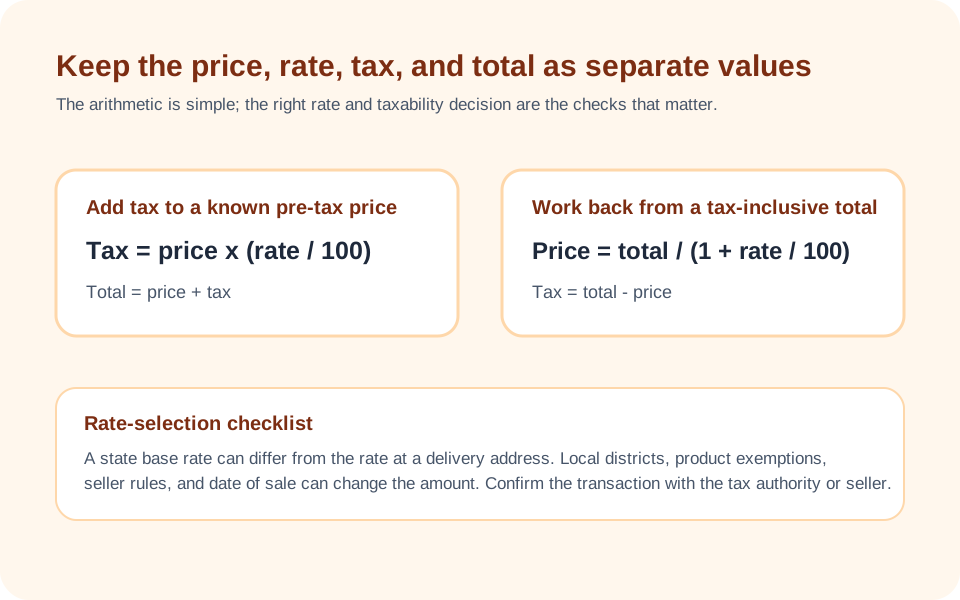
Combined rate = entered state rate + entered local rate. Tax = pre-tax price x combined rate / 100. Total = pre-tax price + tax. For a tax-inclusive total, pre-tax price = total / (1 + combined rate / 100).
Assumptions on this page
- The state selector copies an editable base-rate starting value from a stored preset table. The value is not verified as current or transaction-specific; check the applicable official authority for the sale, delivery, or use location.
- The calculation assumes the entered item is taxable at the entered combined rate; exemptions, tax holidays, special districts, fees, and product-specific rules are not determined by the tool.
- The displayed tax is rounded to cents by the calculator. Invoice and filing rules can require a different rounding or reporting method.
Sources used on this page
- Texas Comptroller: Sales and Use Tax Rates Used to show why an official, location-specific rate check may be needed; it is not used to validate every stored state preset.
- New York Department of Taxation and Finance: Sales tax rates Used as an official illustration that combined rates vary by jurisdiction and transaction location; it is not used to validate every stored state preset.
Everything behind the Sales Tax Calculator
Formulas, reference charts, and detailed answers — expand any section you need.
Start with the transaction, not the state average
Sales-tax arithmetic is quick once the correct rate and taxability are known. Finding those two inputs is the harder part. A state rate alone may omit county, city, transit, special-district, destination, delivery, or use-tax rules. Some goods and services are exempt, taxed differently, or subject to a temporary rule. This calculator therefore does not claim to identify the legally applicable rate. It gives you a visible way to calculate from the combined rate you have checked.
Before entering a price, identify where the sale or delivery occurs, whether the item or service is taxable there, and whether the price is pre-tax or already tax-inclusive. Use an official jurisdiction tool or tax authority for that research. The Texas Comptroller, for example, explains that its 6.25% state rate can be combined with local sales taxes and directs users to an address-based rate locator. That is why a generic number should not be treated as a completed transaction calculation.
The model uses one combined rate
The page adds the entered state and local percentages to form one combined rate. For a pre-tax price, it multiplies the price by that rate and divides by 100. It then adds the computed tax to the price. For example, a taxable $100.00 purchase at an entered 6.25% combined rate produces $6.25 tax and a $106.25 total.
When you know only the total, the page works backwards. At a 6.25% entered rate, a tax-inclusive $106.25 total is divided by 1.0625, which returns a $100.00 pre-tax price and $6.25 of tax. This reverse calculation is useful for checking a receipt or separating an included amount in a simple budget, but it cannot determine whether the receipt used the right rate or whether a non-tax fee was included.
Why address and product details can matter
Jurisdictional rates can change across municipal boundaries, and delivery transactions may be governed by rules that are not the same as a walk-in sale. The New York Department of Taxation and Finance, for instance, publishes combined state and local rate information and explains that rates vary by location. That official example does not set the rules elsewhere; it demonstrates why this calculator needs a checked local rate rather than a broad assumption.
Taxability is also separate from rate arithmetic. Food, digital products, construction materials, labor, medical items, resale purchases, nonprofit purchases, and business inputs can have different treatment depending on the jurisdiction and facts. Entering 0% for a particular item may be appropriate only after checking the relevant authority. If the input is uncertain, run a range of rates for budgeting and label the result as provisional.
A purchase estimate is not an invoice or return
The calculator rounds its tax result to cents. A seller may apply rounding by line item, invoice, jurisdiction, or reporting period. Shipping, installation, mandatory fees, discounts, coupons, deposits, and bundled items can change the taxable base. A point-of-sale system may also calculate tax differently from a simple total-times-rate estimate while still complying with the local rule.
For a household estimate, recording the pre-tax price, rate source, and total is usually enough to show the cost of a planned purchase. For a business invoice, tax return, audit response, or high-value transaction, use the tax authority's guidance and a qualified professional where appropriate. The Budget Calculator can help turn confirmed after-tax costs into a spending plan, but neither page performs compliance work.
Useful checks for a tax-inclusive receipt
When a receipt shows a total but not the tax base, first confirm that the displayed total includes only taxable items at one rate. Then enter the combined rate, calculate backward, and compare the reconstructed tax to the receipt. A mismatch can signal a rounding difference, a discount applied before tax, a separate fee, a mixture of taxable and exempt items, or simply a different rate. Do not change the rate merely to force a match without understanding the receipt.
If an invoice has multiple locations or rate groups, calculate each group separately. Adding all pre-tax prices first and applying one blended rate can be misleading when products or delivery destinations differ. A small table with one row per jurisdiction and taxability treatment is clearer than a single number, especially for an ongoing project or a purchase that includes materials and services.
Use the rate field responsibly
The state selector copies an editable starting rate, not a verified current or transaction-specific rate. Local fields are intentionally editable because rate research belongs to the specific transaction. The Texas Comptroller guidance is a practical example of the right workflow: use the authority's address-based resource where applicable, then carry the resulting combined rate into a calculation.
Keep an issue report useful by sharing the public jurisdiction, the non-sensitive price, the entered rate, and the expected arithmetic. Do not attach card numbers, full receipts containing personal data, tax account credentials, or customer details. The page's Report an issue control is for calculator problems and factual corrections, not for individual tax rulings.
Plan a total cost, not just a sticker price
A purchase decision often needs more than sales tax. Delivery, financing, recurring maintenance, insurance, registration, and disposal can be larger than a small rate difference. This page is intentionally narrow: it explains price, rate, tax, and total. Use it alongside the Auto Loan Calculator for a financed vehicle scenario or the Home Affordability Calculator for a broader housing scenario, while keeping the assumptions separate.
That separation avoids false precision. The sales-tax result can be exact arithmetic under an entered rate, yet still be the wrong transaction total if the input rate, taxable base, or product treatment is wrong. Clear inputs are more valuable than a longer decimal.