
Home Affordability Calculator
Estimate a home-price range from income, recurring debt, down-payment, rate, property-tax, insurance, HOA, and modeled mortgage-insurance inputs. Compare a user-defined comfortable budget with a separate higher debt-to-income scenario without treating either as an approval.
Example Scenarios
$110k Household
$500/mo debts • $40k down
First-Time Buyer
$85k • 5% down • 6.75%
$500k Target Home
What income is needed?
Dual Income
$150k + $45k • 20% down
Affordability Inputs View Results
Affordability Summary
—
Target Home Payment & DTI
| Full PITI at target price | — |
| Front-end DTI at target | — |
| Back-end DTI at target | — |
Comfortable vs Higher-DTI Planning Scenario
| Metric | Comfortable | Higher-DTI scenario |
|---|---|---|
| Home price | — | — |
| Monthly PITI | — | — |
Down Payment Comparison (5% / 10% / 20%)
| Down | Price | Loan | PITI | PMI | Cash at Closing |
|---|
Debt Impact: Buying Power per Debt
| Debt | Payment | Power Lost | Price if Eliminated |
|---|
Rate Sensitivity (Comfortable Price)
| Rate Scenario | Comfortable Price | Monthly PITI |
|---|
How This Is Calculated
Affordability uses the 28/36 rule: housing PITI ≤ 28% of gross monthly income and total debts (housing + other) ≤ 36%. Price is solved backward from the max payment using M = P · r(1+r)ⁿ / ((1+r)ⁿ − 1) plus taxes, insurance, PMI, and HOA:
Check the method before you use the estimate
This page documents the formula, assumptions, and any specific external sources used for this tool.
See the methodPlanning estimate What this result can and cannot tell you
Educational affordability estimate only. This is not financial advice, a mortgage prequalification, preapproval, offer, credit decision, or tax analysis. Verify your actual budget, lender criteria, local ownership costs, and loan disclosures before making a housing decision.
How the Home Affordability Calculator works
These notes describe the calculation used on this page and the assumptions that can change a real-world result.
Gross monthly income = (income + co-borrower income) / 12; effective housing budget = max(0, min(income * front-end limit, income * back-end limit - monthly debts)). The calculator then solves for the highest price whose modeled PITI + HOA fits that budget.
Assumptions on this page
- Front-end and back-end ratios are editable planning limits selected by the user; they are not universal lending rules or approval thresholds.
- The price solve uses a fixed-rate amortizing principal-and-interest payment plus user-entered property-tax rate, insurance, HOA, and modeled mortgage-insurance inputs.
- Income, debt, down payment, closing-cost rate, property value, rates, taxes, insurance, and product terms can all change a real lender's analysis.
- The result is a budgeting scenario, not a prequalification, preapproval, loan offer, or a recommendation to spend the maximum shown.
Sources used on this page
- HUD: Buying a Home Used for the reminder that affordability depends on income, credit, monthly expenses, down payment, and interest rate rather than one price figure.
- CFPB: What is a Qualified Mortgage? Used for the limitation that a lender's analysis can consider and verify income, assets, debts, and other loan-specific requirements.
Everything behind the Home Affordability Calculator
Formulas, reference charts, and detailed answers — expand any section you need.
Affordability is a cash-flow question before it is a price question
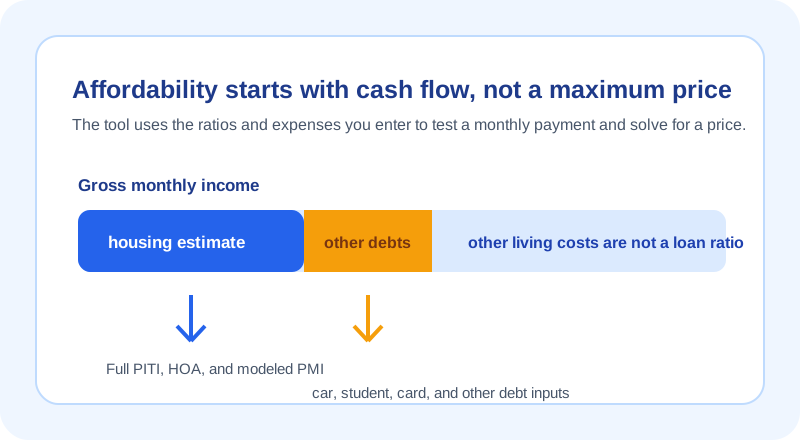
A home-price estimate becomes more useful when you begin with monthly cash flow instead of a listing price. Enter the household income, recurring monthly debt, down-payment choice, mortgage rate, term, property-tax rate, insurance, HOA, and any mortgage-insurance assumption. The calculator turns those inputs into a modeled full housing payment, then solves backward to a price that fits the limits you choose.
This page deliberately presents a “comfortable” scenario and a separate higher debt-to-income scenario rather than labeling either one a guaranteed maximum. A lender can use different underwriting methods, and your own budget includes expenses that are not captured by a simple ratio. HUD notes that affordability depends on income, credit, monthly expenses, down payment, and rate; this tool helps make those planning inputs visible, not replace that broader review.
How the budget limit is calculated
First, the calculator combines the income fields and divides by 12 to obtain gross monthly income. It then calculates two ceilings: a front-end housing limit and a back-end limit after the recurring debt amount is subtracted. The effective modeled housing budget is the lower of those two values, with negative results set to zero.
Next, the page repeatedly tests prices until the full modeled payment fits the budget. That payment includes fixed-rate principal and interest, user-entered property tax and insurance, HOA, and modeled mortgage insurance where selected. The chosen percentages are not statements of what every lender will use.
Worked scenario: let both limits compete
Consider a household with $120,000 of combined annual income and $500 of recurring monthly debt. Gross monthly income is $10,000. If the user enters a 28% front-end limit and a 36% back-end limit, the front-end ceiling is $2,800 per month. The back-end ceiling is $10,000 × 0.36 - $500 = $3,100 per month. The calculator therefore uses $2,800 as the effective modeled housing budget.
The final price depends on the other inputs. A larger down payment can reduce the modeled loan balance, while property tax, insurance, HOA, and a rate change can move the full payment in the other direction. This is why the output is a range to examine, not an amount to offer or borrow. Use the Mortgage Calculator to inspect the full payment for any particular price you are considering.
Debt-to-income inputs do not replace a real loan review
The page calls the upper scenario a planning comparison, not a lending standard. A real lender can verify income, assets, debts, property characteristics, product rules, credit information, and other factors. The CFPB's Qualified Mortgage overview illustrates why a real assessment has more moving parts than one percentage: it describes consideration and verification of income or assets and monthly debt.
Use the calculator to see the sensitivity of your own assumptions. If a car payment, student loan, or card payment changes, rerun the page with that new amount rather than treating an old price output as permanent. The Loan Calculator can help translate a separate installment balance into a payment input when you are building a budget.
Cash to close and monthly ownership costs are separate decisions
A home can fit a monthly ratio while still requiring more cash than you have planned. This calculator separately estimates the down payment and a user-entered closing-cost percentage for its modeled price. It cannot identify every program, grant, seller credit, inspection, moving, repair, reserve, or local cost. Keep your available cash and an emergency reserve separate from the monthly-payment question.
Likewise, property tax and insurance should be local, traceable inputs. The CFPB's home-buying cost guidance is a useful reminder that a listing price is not the entire cost of buying or owning. Use the Down Payment Calculator to compare cash-to-close assumptions for a chosen price.
Use the output as a budget checkpoint
- Enter income and recurring debt that match the same household and time period.
- Choose ratio limits you want to test, and write down why they are appropriate for your own planning.
- Use an offer-specific rate when one exists; otherwise label the rate as an assumption.
- Replace generic ownership-cost placeholders with local tax, insurance, and HOA information.
- Test a lower price or rate change before committing to a maximum result.
If an input label, formula, or output is unclear, report it through the page's issue form with non-sensitive sample values. That supports correction without turning the calculator into an application form.