
Mortgage Refinance Calculator
Compare the remaining cost of a current mortgage with a modeled replacement loan. Keep current balance, payment, rate, remaining term, new rate, new term, closing costs, and cash-out assumptions visible before drawing a conclusion.
Example Scenarios
Rate Drop
7.5% → 6.25%
Big Rate Drop
8% → 6%
Small Rate Drop
6.75% → 6.25%
Shorten Term
30yr → 15yr
Refinance Details View Results
Refinance Analysis
Enter your loan details to see how the entered assumptions affect the modeled comparison.
| Current payoff date | — |
| New payoff date | — |
Balance Over Time: Current vs. New
New Loan Amortization
| # | Date | Principal | Interest | Balance | Cum. Interest |
|---|
How This Is Calculated
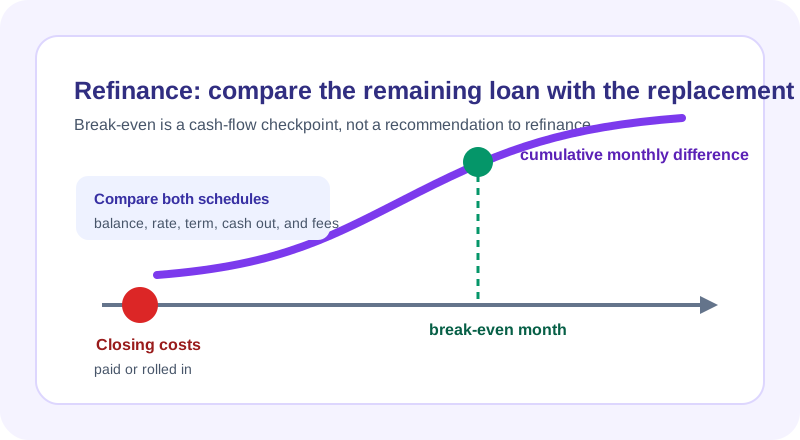
Break-even is closing costs divided by monthly savings; lifetime interest is compared across both amortization schedules, with your own numbers:
Check the method before you use the estimate
This page documents the formula, assumptions, and any specific external sources used for this tool.
See the methodPlanning estimate What this result can and cannot tell you
Educational refinance comparison only. This is not financial advice, a recommendation, loan offer, approval, tax analysis, or legal advice. Confirm replacement-loan terms, fees, cash to close, rate-lock details, servicing terms, and the effect on your individual situation with the lender or a qualified professional.
How the Mortgage Refinance Calculator works
These notes describe the calculation used on this page and the assumptions that can change a real-world result.
New loan = current balance + cash out + rolled-in closing costs; M = P * [r(1 + r)^n] / [(1 + r)^n - 1]; cash break-even months = out-of-pocket closing costs / monthly payment difference when the modeled new payment is lower.
Assumptions on this page
- The current path uses the balance, rate, and payment you enter; the replacement path uses a fixed rate and term you enter.
- Closing costs may be paid out of pocket or added to the modeled new balance. A rolled-in cost is not treated as free; it changes the amount financed and schedule.
- The break-even display is only a cash-flow checkpoint. It does not price every fee, tax consequence, lender credit, rate-lock condition, property change, or future move.
- The calculator does not determine whether refinancing is available, beneficial, approved, or suitable for an individual situation.
Sources used on this page
- CFPB: Mortgage refinance definition and key terms Used for the explanation that a refinance replaces an existing mortgage and may involve a new rate, term, costs, or additional borrowing.
- CFPB: What is a Loan Estimate? Used for the reminder that an application-specific Loan Estimate identifies projected rate, payment, closing costs, taxes, insurance, and special features.
Everything behind the Mortgage Refinance Calculator
Formulas, reference charts, and detailed answers — expand any section you need.
A refinance is a replacement loan, not a rate swap
Refinancing normally pays off the old mortgage and creates a new loan. That means the analysis should begin with the current remaining balance, current payment, interest rate, and remaining time to pay it off. The proposed loan then needs its own rate, term, closing-cost treatment, and any cash-out amount. Comparing only the headline rate can hide a longer term, a larger balance, or a different amount due at closing.
This calculator puts those two schedules side by side. Its purpose is to make the arithmetic inspectable, not to announce that a refinance is good or bad. It cannot see the actual offer, a lock agreement, points, lender credits, a property appraisal, taxes, or a future move. For a broader explanation of the inputs, see the existing Should I Refinance My Mortgage? guide, then return here with the specific figures you want to test.
Build both payment paths from the balance forward
For each fixed-rate path, the principal-and-interest payment is calculated from the modeled balance, monthly rate, and number of payments. The payment equation is:
For the replacement path, this page first builds a new principal: current balance + any cash out + closing costs if you select “roll in.” It then creates a fresh amortization schedule. The current path uses the payment you enter when provided, so it can model the remaining payoff schedule instead of assuming the original loan has just begun. This distinction is essential when the current loan has already been paid down for years.
Worked scenario: a lower payment can still extend repayment
Assume a remaining balance of $220,000, a fixed 6.5% rate, and 300 months left. The standard formula gives a current principal-and-interest payment of $1,485.46. A hypothetical replacement with the same $220,000 balance at 5.75% over a new 360-month term gives $1,283.86 before any closing costs are added. The modeled monthly difference is $201.60.
That lower payment does not by itself show a lower lifetime cost: the new term is 60 months longer in this example. Add a realistic closing-cost number and test it both out of pocket and rolled into the balance. Then compare the total remaining interest and payoff dates alongside the payment. This is exactly why a refinance screen should show a schedule rather than stopping at the monthly amount.
Use break-even carefully
When closing costs are paid out of pocket and the modeled replacement payment is lower, this page calculates a simple cash break-even: out-of-pocket closing costs divided by the monthly payment difference. For example, a $3,000 out-of-pocket cost divided by a modeled $200 monthly difference gives 15 months. It is a useful checkpoint: if the loan ends, is sold, or changes before that point, the simple payment savings have not yet offset those cash costs.
A rolled-in cost needs a different reading. It may make the out-of-pocket cash value appear to be zero while increasing the principal that earns interest. Compare the new balance and total remaining interest directly. Do not treat either approach as universally better; the calculator is showing two ways an input changes a schedule, not choosing an offer.
Read the documents that the calculator cannot recreate
A lender's application-specific figures are more detailed than a generic model. The CFPB explains that a Loan Estimate provides expected rate, payment, closing costs, taxes, insurance, and certain loan features. Compare those entries with the inputs you use here, including whether the quoted payment includes escrow items or only principal and interest.
Also test the result with the same remaining term, a shorter term, and the term offered. A lower payment caused by a longer term answers a cash-flow question; it does not answer the total-cost question. Use the Mortgage Calculator for a clean payment composition and the Amortization Calculator to inspect a single schedule without refinance assumptions.
A transparent refinance checklist
- Use the current payoff balance, not the original loan amount.
- Record the current payment and remaining months from current records.
- Enter the proposed rate, rate type, term, cash-out amount, and every fee you know.
- Run closing costs both paid now and rolled into principal if each is available.
- Compare payment, payoff date, remaining interest, and cash-to-close before treating a lower payment as a savings claim.
If the math or a label needs correction, report it with non-sensitive sample inputs through the page's issue form. The site will not ask you to put account numbers, an application, or private lender documents into the report.