
Amortization Calculator
Build a fixed-rate amortization schedule from the principal, annual rate, term, and optional extra-payment inputs you enter. Inspect every modeled payment's interest, principal, remaining balance, and cumulative interest rather than relying on a single total.
Example Loans
30-Year Mortgage
$300,000 • 7% • 30 yr
Personal Loan
$20,000 • 10% • 5 yr
Auto Loan
$35,000 • 7.5% • 6 yr
Student Loan
$30,000 • 6% • 10 yr
Loan Details View Results
Amortization Summary
Principal vs Interest by Payment
Payment Inspector
Amortization Schedule
| # | Date | Payment | Interest | Principal | Balance |
|---|
How This Is Calculated
Payments use M = P · r(1+r)ⁿ / ((1+r)ⁿ − 1). Each month, interest = balance × (APR ÷ 12) and principal = payment minus interest (plus any extras).
Check the method before you use the estimate
This page documents the formula, assumptions, and any specific external sources used for this tool.
See the methodPlanning estimate What this result can and cannot tell you
Educational amortization estimate only. This is not financial advice, a payoff quote, loan offer, or legal disclosure. Confirm your actual balance, rate, payment due date, extra-payment posting rules, fees, and payoff amount with the lender or servicer.
How the Amortization Calculator works
These notes describe the calculation used on this page and the assumptions that can change a real-world result.
M = P * [r(1 + r)^n] / [(1 + r)^n - 1]; for each month, interest = opening balance * r, principal = M - interest + selected extra payment, and closing balance = opening balance - principal.
Assumptions on this page
- The schedule assumes a fixed annual rate, equal monthly scheduled payments, and a term entered by the visitor.
- Extra monthly, annual, and one-time amounts are added to modeled principal after the scheduled interest calculation; actual payment posting can differ by lender or servicer.
- Payment dates are displayed from the selected start month and do not account for real statement cycles, per-diem interest, fees, escrow, rate changes, or payment holidays.
- The schedule is a planning tool, not a payoff quote, legal disclosure, or a substitute for loan documents.
Sources used on this page
- CFPB: Principal-and-interest payment versus total monthly mortgage payment Used for the explanation that principal and interest are components of a loan payment and that other costs can sit outside the loan schedule.
- CFPB: Mortgage servicer information and payoff requests Used for the reminder that actual statements and servicer information identify payment application and account-specific payoff details.
Everything behind the Amortization Calculator
Formulas, reference charts, and detailed answers — expand any section you need.
An amortization schedule is the audit trail behind a payment
A monthly payment alone does not explain how a loan balance changes. This calculator builds a row for each modeled payment so you can see the opening balance effect in action: interest for the month, scheduled principal, any extra principal, remaining balance, and cumulative interest. That makes a term comparison or payoff scenario easier to review than a single “total interest” number.
The page is designed for a fixed-rate, equal-payment loan. It does not retrieve an account balance, rate type, escrow amount, fee, or due date. Start with the actual figures from your records or an offer, and use this page to check the arithmetic behind those assumptions. For a payment estimate that also separates property tax, insurance, and HOA, use the Mortgage Calculator.
How the schedule is calculated
The calculator first finds the constant principal-and-interest payment from the amount borrowed, monthly rate, and number of months. It then updates the balance one period at a time. Interest is calculated from the opening balance; scheduled principal is the payment left after interest. Any extra-payment input is added to principal in that month's model.
The result is capped at the remaining balance in the final row so the model does not pay more principal than is outstanding.
Worked scenario: reproduce the first row
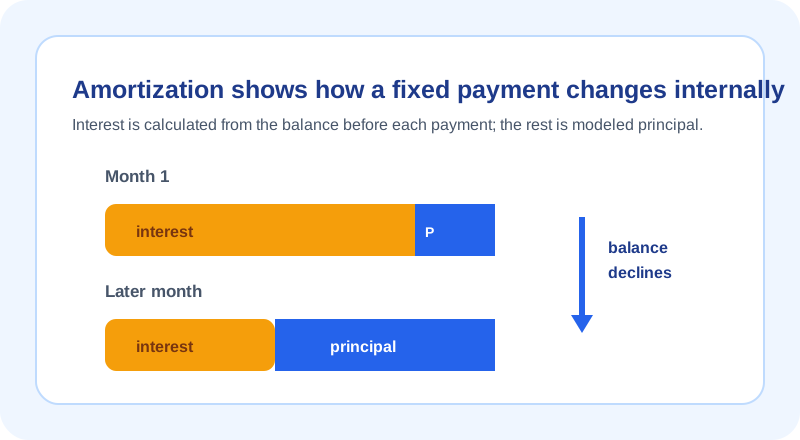
Suppose a $10,000 balance is modeled at a fixed 8% annual rate for 24 monthly payments. The fixed payment equation gives $452.27 per month. In month one, interest is $10,000 × 0.08 / 12 = $66.67. The scheduled principal is therefore $452.27 - $66.67 = $385.61, leaving a modeled balance of $9,614.39 before the next month's interest calculation.
The second row begins from that lower balance, so its interest will be slightly lower and its principal share slightly higher if the payment stays the same. This is the entire logic behind the changing bars in a standard amortization table. You can use the same first-row check with your own inputs before relying on a longer schedule.
Why early payments often show more interest
Interest is not front-loaded by a hidden rule in this calculation. It is larger early because the opening balance is larger. The scheduled payment is fixed in a standard model, so the remaining portion available for principal is smaller at the start. As principal reduces the balance, the next month's interest is calculated on less money and more of the same payment can reduce principal.
The crossover row marks the first modeled payment in which principal exceeds interest. It is an output of the assumptions, not a universal milestone. Different rates, terms, extra amounts, or payment structures change it. If the actual loan has a variable rate, balloon feature, deferred interest, payment option, or nonstandard schedule, this fixed-rate table is not the correct model.
Extra-payment schedules need actual posting instructions
You can add an extra monthly amount, an annual extra applied in a selected calendar month, or a one-time amount. The calculator treats those as additional principal after the monthly interest calculation. That shows a transparent best-case arithmetic path if the lender credits the money as assumed.
Before sending extra money, confirm how the lender or servicer applies it. A real payment can be subject to cutoff dates, a future-due status, fees, escrow treatment, or product-specific instructions. The CFPB's servicer guidance is a useful reminder to check actual statement and payoff information. Use the Mortgage Payoff Calculator if your goal is specifically to compare payoff acceleration strategies.
Use a schedule to ask better questions
- Verify the starting balance, annual rate, and remaining term come from the same loan position.
- Check the first row manually using opening balance × annual rate / 12.
- Compare annual summaries as well as the final payoff date and total modeled interest.
- Keep property taxes, insurance, escrow, and fees outside a principal-and-interest schedule unless you separately track them.
- Ask the lender or servicer how an actual extra payment is handled before acting.
If a formula, row, or label seems incorrect, submit a non-sensitive example through the issue form. Do not send account numbers or statement screenshots.