
Mortgage Calculator
Estimate a fixed-rate mortgage payment with your own price, down payment, rate, term, property tax, insurance, modeled mortgage insurance, HOA, and optional extra-payment inputs. See each part of the estimate and a payment-by-payment schedule.
Example Scenarios
Starter Home
$300k • 10% down • 30yr • 7%
Standard (20% Down)
$450k • 20% down • 30yr • 6.5%
15-Year Fixed
$400k • 20% down • 15yr • 6%
Jumbo Loan
$800k • 20% down • 30yr • 6.75%
Loan Details View Results
Your Payment Breakdown
| Property tax /mo | $0 |
| Home insurance /mo | $0 |
| Modeled mortgage insurance /mo | $0 |
| HOA /mo | $0 |
Balance & Interest Over Time
What If I Pay Extra Each Month?
| Extra / mo | Payoff time | Total interest | Interest saved |
|---|
Amortization Schedule
| # | Date | Principal | Interest | Balance | Cum. Interest |
|---|
How This Is Calculated
Principal & interest use the standard amortization formula M = P · r(1+r)ⁿ / ((1+r)ⁿ − 1), with your own numbers plugged in:
Check the method before you use the estimate
This page documents the formula, assumptions, and any specific external sources used for this tool.
See the methodPlanning estimate What this result can and cannot tell you
Educational mortgage-payment estimate only. This is not financial advice, a loan offer, approval, affordability determination, tax advice, or legal advice. Confirm current terms, required insurance, taxes, escrow, mortgage-insurance rules, and closing costs with the lender, servicer, insurer, and relevant local sources.
How the Mortgage Calculator works
These notes describe the calculation used on this page and the assumptions that can change a real-world result.
M = P * [r(1 + r)^n] / [(1 + r)^n - 1]; displayed monthly estimate = M + annual property tax / 12 + annual home insurance / 12 + modeled PMI + HOA.
Assumptions on this page
- The principal-and-interest schedule assumes a fixed annual rate, monthly payments, and the term you enter.
- Property tax, insurance, HOA, mortgage-insurance rate, and extra payments are user inputs; the calculator does not retrieve local quotes, lender terms, escrow adjustments, or a Loan Estimate.
- The modeled PMI end point is a balance threshold used for planning only. Your loan documents and servicer determine whether, when, and how mortgage insurance changes.
- The result is a scenario, not a loan approval, offer, affordability decision, or a substitute for reviewing lender disclosures.
Sources used on this page
- CFPB: principal-and-interest payment versus total monthly mortgage payment Used for the distinction between principal and interest and other mortgage-payment components such as taxes, insurance, and mortgage insurance.
- CFPB: What is a Loan Estimate? Used for the reminder that actual mortgage terms, projected payments, closing costs, taxes, and insurance are shown in lender disclosures.
- CFPB: When can I remove private mortgage insurance (PMI)? Used for the limitation that the page's 80%-balance milestone is not a statement of cancellation or termination rights.
Everything behind the Mortgage Calculator
Formulas, reference charts, and detailed answers — expand any section you need.
Use a mortgage estimate as a worksheet, not a promise
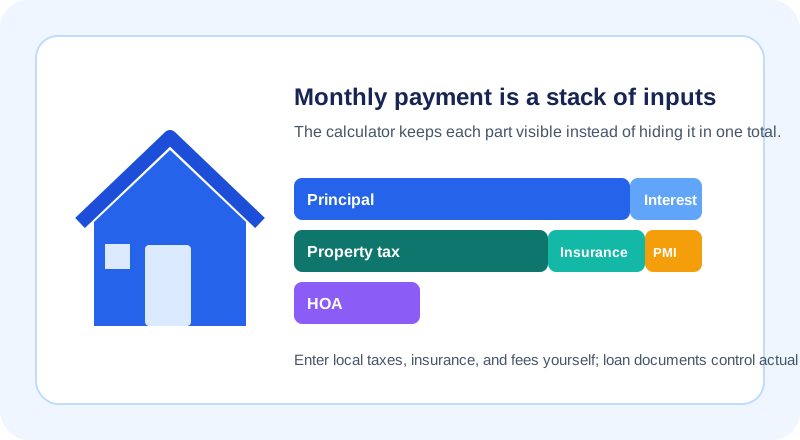
A mortgage payment is easiest to audit when it is built from visible parts. Start with the purchase price and down payment to establish the amount borrowed. Then enter the rate and term for the fixed principal-and-interest calculation. Finally, add the annual property-tax estimate, homeowners-insurance estimate, any monthly HOA dues, and a mortgage-insurance rate only when it applies to the scenario you are testing.
This page deliberately keeps those inputs separate. It can show how a changed rate, a different down payment, or an extra principal amount changes this modeled schedule; it cannot know a lender's underwriting result, a future escrow adjustment, a local tax bill, an insurer's premium, or the terms of a particular loan. For a budget-led price range, use the separate Home Affordability Calculator before treating any single payment as comfortable.
How the monthly payment is constructed
For a fixed-rate, fully amortizing loan, the calculator uses the standard payment equation. P is the amount borrowed, r is the annual rate divided by 12, and n is the total number of monthly payments:
It then adds the monthly versions of the non-loan inputs you supply. That mirrors the important distinction in the CFPB's explanation of principal-and-interest versus a total mortgage payment: taxes, insurance, and mortgage insurance can sit outside the basic loan formula. HOA dues are also displayed as a separate monthly input here.
Worked scenario: check the loan math before adding local costs
Suppose a buyer tests a $300,000 price with a $60,000 down payment. The modeled balance is $240,000. At a fixed 6% annual rate over 360 monthly payments, the equation above gives a principal-and-interest payment of $1,438.92 per month. That figure is independently reproducible from the formula: use P = 240,000, r = 0.06 / 12, and n = 360.
The useful next step is not to guess a universal full payment. Enter the property's actual or researched annual tax estimate, the insurance quote or planning estimate, and any HOA fee as separate fields. If the down payment is below the threshold you want to model, add a mortgage-insurance rate as an input and treat the resulting removal month as a schedule estimate to verify with the loan documents. The Down Payment Calculator can help compare cash-to-close scenarios without turning a percentage into a rule for every borrower or product.
Why the amortization table matters
Each scheduled payment is split from the opening balance for that month. Monthly interest is the balance multiplied by the monthly rate; principal is the scheduled payment minus that interest. Early in a typical fixed-rate schedule, more of the payment is interest because the balance is larger. The balance falls as principal is applied, so the mix changes over time.
The table is useful for checking the date, balance, principal, and cumulative interest behind a result. Use the Amortization Calculator when you want a focused schedule, or the Mortgage Payoff Calculator to compare a separate extra-payment scenario. An additional payment only helps this model when it is applied to principal as assumed; ask the servicer how it will be posted on your actual loan.
Compare disclosures and ownership costs outside the formula
A lower principal-and-interest number is not enough to compare mortgage offers. A rate, term, lender charge, cash-to-close amount, rate lock, mortgage-insurance requirement, escrow arrangement, and prepayment provision can change the decision. The calculator does not parse those documents or decide which offer is better. Use the figures here to prepare questions, then compare the lender's standardized disclosures line by line.
The CFPB explains that a Loan Estimate includes estimated rate, payment, closing costs, taxes, insurance, and features that may change payments or balance. That is the document-level source for an actual application; the fields on this page remain editable planning inputs.
A repeatable check before relying on the result
- Confirm that the price, down payment, and term describe the same scenario.
- Use a rate from the offer you are comparing, and record whether it is fixed or adjustable; this calculator's schedule is fixed-rate only.
- Enter taxes, insurance, HOA, and mortgage-insurance inputs from a traceable local source rather than a national average.
- Review the first payment, the last payment, total interest, and any extra-payment assumptions in the schedule.
- Keep the calculator result beside the lender's disclosure, not in place of it.
If an equation, label, or default looks wrong, use the page's Report an issue control with non-sensitive sample inputs. That creates a correction path without asking visitors to expose private financial information.