
Salary Calculator
Convert the gross pay amount, pay frequency, work schedule, and optional overtime inputs you enter into equivalent gross hourly, weekly, monthly, and annual amounts. It is not a payroll, tax, wage-law, or employment-status calculation.
Pay Details View Results
Gross pay conversion only — no tax. For net pay after deductions, use the Take-Home Pay Calculator or US Paycheck Calculator.
Pay at Every Frequency
Common Conversions (40 hrs, 52 wks)
| Hourly | Annual | Annual | Hourly |
|---|---|---|---|
| $15/hr | $31,200 | $50,000 | $24.04/hr |
| $20/hr | $41,600 | $75,000 | $36.06/hr |
| $25/hr | $52,000 | $100,000 | $48.08/hr |
How This Is Calculated
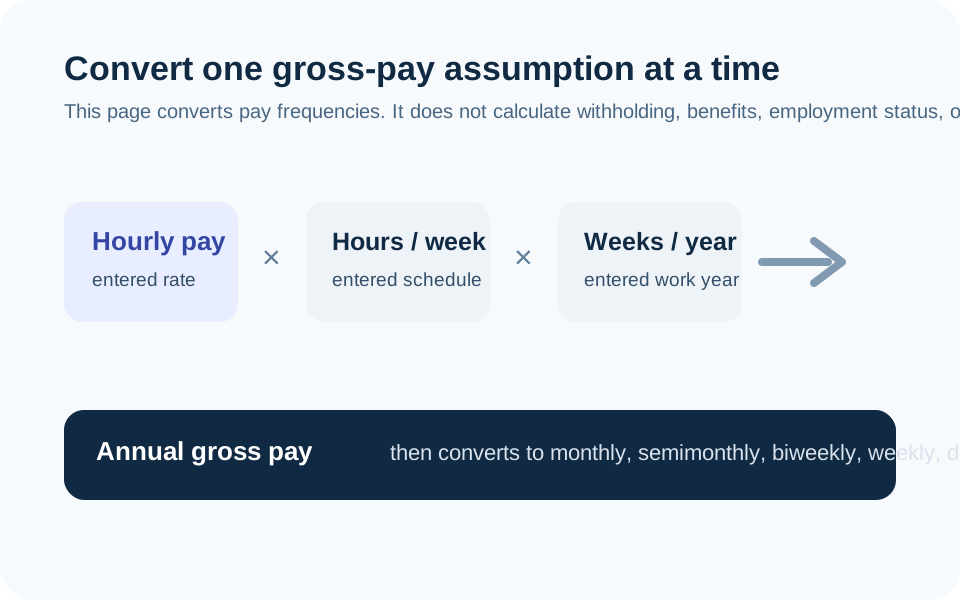
Conversion chain: hourly × hours per week × weeks per year = annual, then annual divides down into weekly, biweekly, semi-monthly, monthly, daily, and equivalent hourly. Overtime adds OT hours at the multiplier when the entered frequency is hourly. True hourly rate = annual ÷ actual hours worked per year.
Check the method before you use the estimate
This page documents the formula, assumptions, and any specific external sources used for this tool.
See the methodPlanning estimate What this result can and cannot tell you
Educational estimate only. This calculator is not a payroll record, wage statement, employment-law analysis, tax calculation, or offer evaluation. Confirm pay, hours, deductions, overtime treatment, and local rules with the employer or an appropriate qualified professional. This is not financial advice.
How the Salary Calculator works
These notes describe the calculation used on this page and the assumptions that can change a real-world result.
For an hourly scenario: annual gross pay = hourly rate × entered regular hours per week × entered work weeks per year, plus any entered overtime amount using its selected multiplier. Other gross frequencies are converted from the annual equivalent.
Assumptions on this page
- All pay, schedule, overtime, and multiplier values are user-entered. The calculator makes no finding about hours worked, employee classification, exemption status, or eligibility for overtime.
- Results are gross pay only and exclude income tax, payroll tax, benefits, deductions, bonuses, commissions, paid leave, unpaid time, shift differentials, and employer-specific policies unless you can represent them with the inputs.
- Overtime is a planning multiplication in this tool. It does not apply federal, state, local, collective-bargaining, or contract rules.
- A calendar month, semimonthly period, biweekly period, and work year are distinct time bases; check the selected period before comparing offers.
Sources used on this page
- U.S. Department of Labor: Fact Sheet #23, Overtime Pay Requirements of the FLSA Supports the limitation that a simple pay-frequency conversion is not a legal determination of overtime pay, exemption status, or regular rate.
Everything behind the Salary Calculator
Formulas, reference charts, and detailed answers — expand any section you need.
This is a gross-pay conversion, not a take-home-pay quote
The Salary Calculator converts the gross amount and work schedule you enter into common pay frequencies. If you enter an hourly rate, it multiplies that rate by regular hours per week and work weeks per year to estimate annual gross pay, then converts the annual amount to weekly, biweekly, semimonthly, monthly, daily, and hourly equivalents.
Gross pay is not the amount deposited in an account. Taxes, payroll deductions, benefits, unpaid time, bonuses, commissions, local rules, and employer policies can materially change take-home pay. Use a current paystub, payroll system, or a separate payroll-specific calculator when the question is net pay.
Check the work-year assumption before comparing numbers
For an hourly example, $25 per hour × 40 hours per week × 52 work weeks equals $52,000 annual gross pay. Change the work weeks from 52 to 48 and the same hourly rate produces a different annual figure because the work year is different. The page makes that assumption visible so that an annual salary and an hourly offer are not compared using hidden schedules.
Likewise, biweekly pay generally has 26 pay periods in a year, while semimonthly pay has 24. A monthly equivalent smooths the annual amount across 12 months; it does not promise that every paycheck is the same.
Treat the overtime field as a scenario input
When you enter overtime hours and a multiplier, the calculator applies the values as a simple gross-pay scenario. It does not decide whether the hours are legally overtime, whether a worker is exempt, what belongs in a regular rate, or how a particular state or employer calculates premium pay.
The U.S. Department of Labor explains that overtime rules can turn on a workweek, regular-rate details, exemptions, and other facts. That is why the output should not be used as a wage claim or employment-law conclusion. Confirm actual terms with the employer or a qualified wage-and-hour resource.
Use equivalent hourly pay with the right denominator
The “true hourly” comparison divides the annual gross amount by the actual hours per year you entered. It can help reveal the schedule assumed behind an annual figure, but it cannot place a dollar value on benefits, paid leave, commuting, job security, health coverage, bonuses, overtime eligibility, or unpaid work time.
For a focused salary-versus-hourly explanation, read the Salary vs. Hourly Pay guide. Then compare the gross figure with real compensation documents rather than a single conversion alone.
Move from gross pay to a usable monthly plan
Once you have a realistic estimate of take-home pay from a current source, enter it into the Budget Calculator as an income scenario. Do not feed the gross annual amount into a household spending plan unless the plan intentionally accounts for the deductions separately.
If a salary or schedule changes, rerun the conversion with the new amount, hours, weeks, and overtime assumption. The old result is not a record of what an employer owes; it is only the arithmetic of the inputs that were entered at that time.
Use the same time basis on both sides of a comparison
A salary comparison can become misleading when one side assumes a full 52-week work year and the other includes unpaid time, seasonal gaps, a shorter contract, variable overtime, or a different pay period. Put each scenario on an annual gross basis first, then inspect the hours used to create that annual number. This does not make benefits or job conditions equivalent, but it prevents a simple period mismatch from driving the result.
For a paycheck plan, do not divide an annual figure and assume every calendar month has the same cash flow. Biweekly and weekly schedules can create months with an extra paycheck, while semimonthly schedules distribute the annual amount differently. Use actual payroll timing, current deductions, and a buffer for variable pay when building a spending plan. The calculator’s monthly figure is an annual average, not a deposit schedule.