
Debt Payoff Calculator
Build a month-by-month payoff estimate from the balances, APRs, minimum payments, and total monthly amount you enter. Compare snowball and avalanche ordering without treating either result as credit, legal, or financial advice.
Debt Payoff Plan
Payoff Results
Extra Payment Impact
Payoff Order
Balance Timeline
Month-by-Month Plan
How This Is Calculated
Each month your full budget pays the active debt while minimums cover the rest. Interest accrues at rate ÷ 12 on each balance, with your own numbers plugged in:
Check the method before you use the estimate
This page documents the formula, assumptions, and any specific external sources used for this tool.
See the methodPlanning estimate What this result can and cannot tell you
Educational estimate only. This tool does not tell you which debts to pay, negotiate, or refinance. Confirm each account’s current balance, rate, minimum, due date, and payment-allocation terms with the creditor, and seek qualified help for decisions that require it. This is not financial advice.
How the Debt Payoff Calculator works
These notes describe the calculation used on this page and the assumptions that can change a real-world result.
For each unpaid balance each month: new balance = prior balance + (prior balance × APR ÷ 12) − payment. The calculator pays entered minimums first, then directs the remaining monthly budget to the selected payoff priority.
Assumptions on this page
- APR is entered as an annual percentage and converted to a monthly rate by dividing by 12. Actual account interest, payment allocation, fees, grace periods, and statement timing can differ.
- The total debt budget is treated as available every month and is not modeled as a recommendation or affordability decision.
- Snowball sorts by smallest entered balance; avalanche sorts by highest entered APR. Ties use the calculator’s documented secondary ordering.
- The estimate does not model new charges, late fees, promotional-rate expiration, debt settlement, taxes, credit-report effects, hardship plans, or creditor-specific payment rules.
Sources used on this page
- Consumer Financial Protection Bureau: How to reduce your debt Supports the description of minimum payments, smallest-balance snowball ordering, highest-rate ordering, and rolling a freed payment into the next debt.
Everything behind the Debt Payoff Calculator
Formulas, reference charts, and detailed answers — expand any section you need.
What this debt payoff calculator models
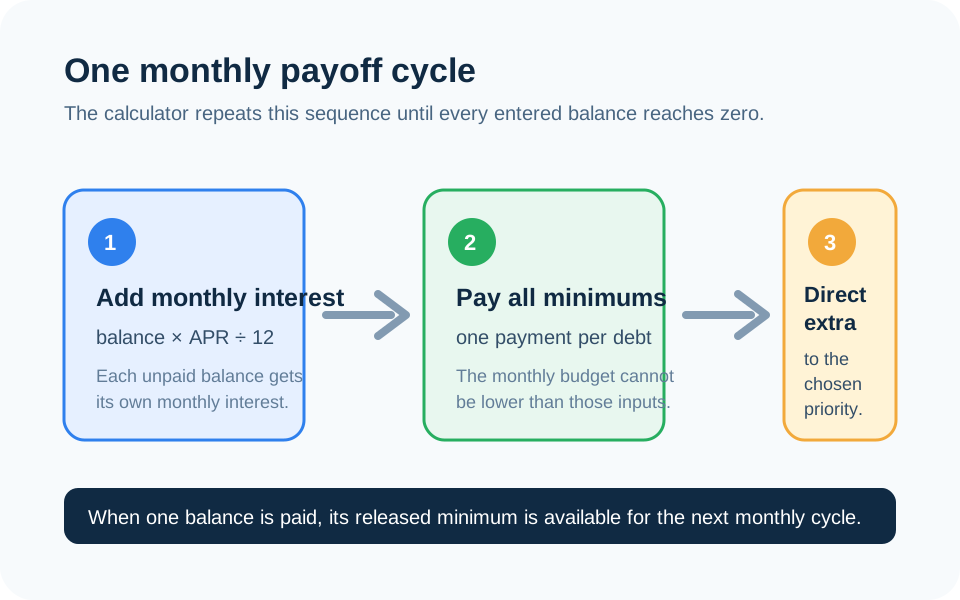
This calculator creates a cash-flow sequence from the numbers you supply: each debt’s balance, APR, and minimum payment, plus one total amount available each month. It adds monthly interest to unpaid balances, pays the minimums, and puts the portion left over toward the strategy you select. When a balance reaches zero, the amount that had been assigned to it is available for the next priority in the following cycle.
The result is useful for comparing the same set of assumptions. It is not a payoff quote, a lender instruction, or a recommendation to close accounts, miss a required payment, or choose one strategy over another. Before entering a plan, copy the balance, APR, minimum payment, promotional-rate end date, and due date from each current statement.
Read one monthly cycle before trusting the finish date
The page uses the same order every month: first it adds interest at balance × APR ÷ 12; next it pays the entered minimum on each active debt; finally, it directs any budget remaining to the selected priority. That order matters. A payment made late, a rate that changes, a fee, a new charge, or a creditor that applies a payment differently can move a real payoff date.
For example, imagine two debts: a $600 balance at 24% APR with a $35 minimum and a $1,800 balance at 12% APR with a $60 minimum. With a $200 total monthly budget, the first modeled month adds $12.00 and $18.00 of interest respectively before payments. The $95 of minimums is applied; the remaining $105 follows the strategy. The calculator then repeats that process on the new balances. This is a reproducible estimate, not a substitute for the account statements.
What snowball and avalanche actually change
Snowball directs the extra amount to the smallest entered balance first. Avalanche directs it to the highest entered APR first. Both modes keep minimum payments in the model for the other active debts and roll freed payment capacity forward after a payoff. The difference is the order—not an assumed change in income, interest rate, or creditor policy.
The Snowball vs. Avalanche guide walks through the distinction with the same kind of inputs. Compare both on this page rather than relying on a generic claim about which method is “best.” If the input rates or balances are incomplete, the dollar difference between the strategies will be incomplete too.
Use the minimum-only line as a diagnostic, not a promise
The minimum-only comparison runs the same month-by-month interest calculation using only the minimum payment supplied for each debt. It helps show how much the fixed monthly budget changes the model. It cannot know whether a creditor will recalculate its minimum, whether a promotional APR will end, or whether a minimum payment is sufficient to amortize the balance under future account terms.
If the sum of your current minimums already exceeds the amount you can pay, do not treat a calculator result as permission to skip payments. The Consumer Financial Protection Bureau’s debt-reduction guidance emphasizes making a plan from bills and interest information. You can also use the Budget Calculator to make the monthly amount visible before comparing payoff sequences.
Inputs that deserve a separate check
- APR and promotions: use the current APR and record when any promotional rate changes.
- Required minimum: use the statement amount, not a percentage remembered from a prior month.
- Payment timing: this calculator uses monthly periods and does not model the account’s daily-balance method or due-date cutoffs.
- New activity: do not assume no new charges if that is unlikely; rerun the plan after material changes.
- Fees and special terms: late fees, annual fees, deferred-interest promotions, settlement offers, and secured debts need their actual terms reviewed separately.
For a single revolving balance, the Credit Card Payoff Calculator can make one payment-versus-interest scenario easier to inspect. For a fixed loan, use the Loan Calculator rather than treating it as an identical credit-card account.