
Budget Calculator
Compare the take-home income and spending amounts you enter with a chosen needs, wants, and savings framework. Use the result to identify gaps, irregular expenses, and unassigned money—not as a universal spending rule or personal financial advice.
Budget Summary
Needs / Wants / Savings (Actual vs Target)
How This Is Calculated
Recommended amounts use your income × framework percentages; gaps compare actual spending to each category target, with your own numbers plugged in:
Check the method before you use the estimate
This page documents the formula, assumptions, and any specific external sources used for this tool.
See the methodPlanning estimate What this result can and cannot tell you
Educational estimate only. This calculator organizes the income and expenses you enter; it is not individualized financial, tax, legal, credit, or investment advice. Confirm bills, account balances, and changing obligations before making decisions. This is not financial advice.
How the Budget Calculator works
These notes describe the calculation used on this page and the assumptions that can change a real-world result.
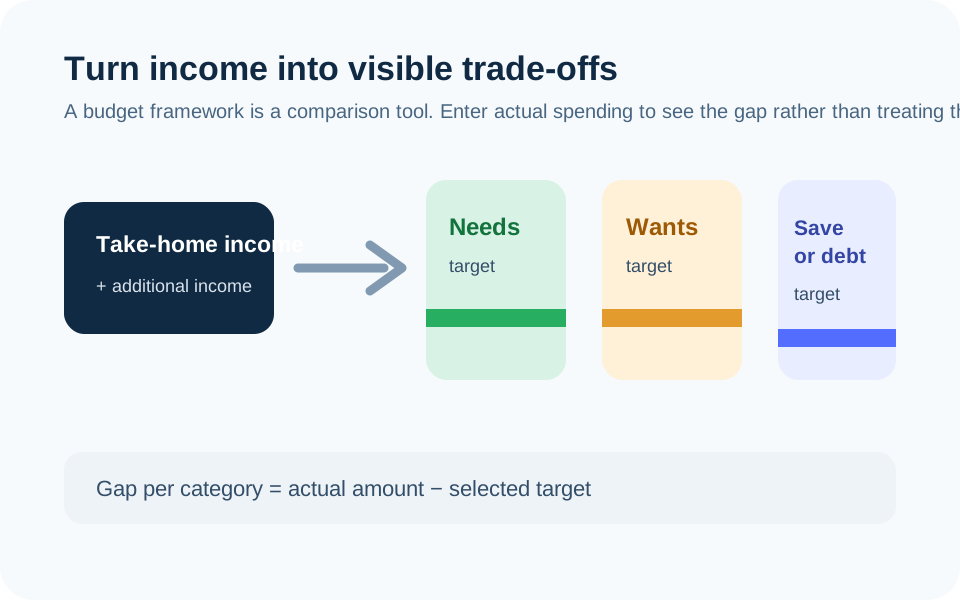
Total income = entered take-home income + additional income. For each selected bucket, target amount = total income × selected percentage. Category gap = entered actual spending − category target.
Assumptions on this page
- The framework percentages are user-selectable planning inputs, not a finding that one split fits all households, locations, debts, or income patterns.
- The calculator uses the income and category values supplied by the visitor. It cannot identify missing bills, irregular expenses, taxes, benefits, cash spending, or changes in income.
- Savings rate and annual projections are arithmetic on entered monthly values; they are not forecasts of account growth or personal outcomes.
- The result does not determine affordability, creditworthiness, eligibility, taxes, investment allocation, or legal payment priorities.
Sources used on this page
- Consumer Financial Protection Bureau: Assess your spending Supports the process of reviewing several months of actual income and spending, including irregular expenses, before relying on a budget.
- Consumer Financial Protection Bureau: My spending rule to live by Supports treating a needs, wants, savings, and debt split as a personal spending rule built from take-home pay rather than a universal prescription.
Everything behind the Budget Calculator
Formulas, reference charts, and detailed answers — expand any section you need.
Start with an “as-is” budget, not an ideal one
A budget becomes useful when it reflects the money that actually comes in and goes out. Enter take-home income—the money available after withholding and other payroll deductions—then review bank, card, cash, and bill records across more than one month. The Consumer Financial Protection Bureau recommends looking back over several months so that less-frequent costs are not lost in a single month’s snapshot.
This page then compares your entered categories with a selected needs, wants, and savings split. It cannot discover expenses you omitted, decide which category is essential for your household, or tell you what you “should” spend. Treat its output as a prompt to inspect the information, not as a verdict.
How the framework and gap calculation work
Total income equals the take-home and additional income amounts you enter. The target for each bucket equals that total multiplied by the percentage you select. With a $4,800 monthly total and a 50/30/20 setup, the arithmetic target is $2,400 for needs, $1,440 for wants, and $960 for savings and debt payoff. A category gap is simply actual amount − selected target.
A positive gap is not automatically an error: an unusually high utility bill, medical bill, seasonal cost, or temporary housing expense may explain it. A negative gap is not automatically extra cash if another expense has not yet been entered. The chart is meant to make those questions visible.
Classify spending in a way you can repeat
Use labels you can apply consistently month after month. One practical approach is to list fixed obligations separately—housing, utilities, insurance, minimum debt payments, transport, and any required care—then record discretionary categories and planned savings or extra debt payments. The 50/30/20 Budget Rule guide explains the buckets as a starting framework rather than a required law.
Do not hide irregular costs in a generic “other” line indefinitely. Annual premiums, school costs, gifts, medical co-pays, repairs, subscriptions, and travel are easier to plan for when they have a visible average or a separate sinking-fund line. Revisit the classification whenever a bill or household situation changes.
A reliable monthly review sequence
- Record the actual take-home income received or expected for the period.
- Enter bills and transactions already known, including planned savings transfers and minimum debt payments.
- Compare actual category totals with the selected targets.
- Mark items that are one-time, irregular, or due on a different schedule.
- Update the next month with the changed inputs rather than copying an old target blindly.
If you are allocating money toward a specific cash target, use the Savings Goal Calculator to test the deposit and time inputs. If the gap is mainly debt payments, use the Debt Payoff Calculator to compare its cash-flow sequence against the amount that is truly available.
What the result cannot tell you
It cannot validate your income, calculate taxes, identify account fees, evaluate a lease or loan, set an emergency-fund target, or recommend cuts to a particular category. A percentage split cannot account for local housing prices, dependent-care needs, medical obligations, variable income, disability, or household responsibilities without your own judgment and up-to-date information.
When expenses exceed income, first check that all entries are current and complete. Then distinguish required payments, optional spending, and items that may need direct discussion with a provider. For an emergency-cash target based on essential expenses, see the Emergency Fund Calculator; its result is also an estimate based on the assumptions you choose.
Keep a short assumptions note beside the numbers
A budget is easier to update when each unusual entry has a note: “annual premium averaged,” “temporary child-care cost,” “three-paycheck month,” or “income not yet received.” That lets you distinguish a recurring pattern from a one-off change when the next month looks different. It also prevents a category target from becoming a hidden claim that the cost will be the same indefinitely.
Review the actual result after bills clear, then replace estimates with real amounts. If cash spending, shared household bills, or payments from several accounts are involved, reconcile them before interpreting a surplus. The calculator can add the numbers you enter, but only a complete record can explain why the total differs from the money left in an account.