
Tip Calculator
Calculate a tip amount, total bill, pre-tax alternative, and equal split from the bill, percentage, tax, and party size you enter. It performs arithmetic only; it does not prescribe tipping norms or determine tax treatment.
Tip Guide
| Service | Customary Tip |
|---|---|
| Restaurant (table) | 18 to 20% |
| Food delivery | 15 to 20%, $3 to $5 min |
| Bar (per drink) | $1 to $2, or 20% on tab |
| Hair salon / barber | 15 to 20% |
| Taxi / rideshare | 10 to 20% |
| Hotel housekeeping | $2 to $5 per night |
| Buffet | 10% |
How This Is Calculated
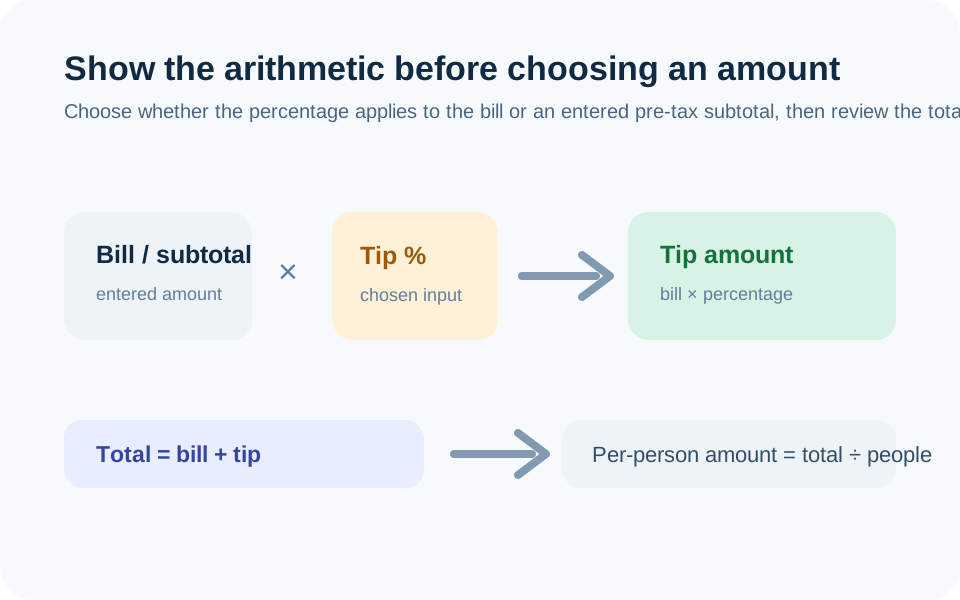
Tip = bill (or pre-tax subtotal) × tip percentage. Total = bill + tip. Split divides totals evenly with per-person amounts rounded up.
Check the method before you use the estimate
This page documents the formula, assumptions, and any specific external sources used for this tool.
See the methodPlanning estimate What this result can and cannot tell you
Educational arithmetic only. This page does not prescribe a tip, determine whether a charge is voluntary, or provide tax advice. Review the bill and any service-charge disclosure before paying; use an appropriate tax resource for reporting questions. This is not financial advice.
How the Tip Calculator works
These notes describe the calculation used on this page and the assumptions that can change a real-world result.
Tip = bill amount (or bill minus entered tax when the pre-tax option is selected) × entered tip percentage. Total = bill + tip. Equal per-person total = total ÷ entered number of people, with displayed amounts rounded as stated on the page.
Assumptions on this page
- The bill amount, tax amount or percentage, tip percentage, rounding choice, and number of people are user-entered. The calculator does not supply a required tipping percentage.
- A pre-tax comparison is arithmetic only. It does not decide whether a business, service provider, or local custom expects a tip on a particular subtotal.
- The result does not account for coupons, surcharges, mandatory service charges, split items, unequal shares, refunds, currency conversion, or payment-app fees unless you first adjust the input.
- A voluntary tip and a mandatory service charge can have different U.S. federal tax reporting treatment; the calculator does not classify a charge for you.
Sources used on this page
- Internal Revenue Service: Tip recordkeeping and reporting Supports the distinction between voluntary tips and mandatory service charges for U.S. federal tax reporting; it does not set a tipping percentage.
Everything behind the Tip Calculator
Formulas, reference charts, and detailed answers — expand any section you need.
Use the calculator to expose the arithmetic, not set a social rule
A tip calculator has four inputs that matter: the bill amount, the percentage you choose, whether you want to compare an optional pre-tax subtotal, and the number of people sharing the payment. The page multiplies the selected base by the selected percentage, adds the result to the bill, and can divide the total equally.
It does not decide what percentage is appropriate for a service, location, party size, or situation. The presets are shortcuts for arithmetic. You remain responsible for reading the bill, checking any mandatory charges, and choosing an amount.
The formula is simple enough to check by hand
For a $50 bill and a 20% input, the tip is $50 × 0.20 = $10, and the total is $60. If three people split that total evenly, $60 ÷ 3 = $20 each. If the page is set to use a pre-tax subtotal, it first subtracts the entered tax from the bill to establish the base for the percentage; the displayed comparison makes both paths visible.
Check the base amount before accepting the result. A percentage applied to a bill that already includes a mandatory service charge answers a different arithmetic question from a voluntary additional amount.
Voluntary tips and mandatory service charges are not identical
For U.S. federal tax reporting, the IRS distinguishes a voluntary amount decided by the customer from a mandatory service charge added by a business. The label on a receipt does not settle every situation. This calculator does not classify the charge or provide reporting advice; it merely lets you calculate a percentage of the number you choose.
Read the receipt before adding a second amount. If a service charge is already present, decide what you intend to pay and use the calculator only to verify the total. The IRS resource in the Sources section is included for this distinction, not as a reason to choose a particular percentage.
Split a bill only after deciding what is shared
The equal-share result divides the whole total by the party size you enter. It is useful when everyone agrees to share the same total. It is not an itemized split: it does not know who ordered what, whether one person used a coupon, who paid a deposit, or whether tax and tip should be split differently.
For an uneven bill, calculate the relevant subtotals separately, apply any chosen percentage to each base, and agree on rounding before paying. This avoids using a single “per person” number as if it represented unequal orders.
Keep one-off bills out of a monthly spending baseline
A meal, delivery, salon, or travel tip may be a one-time expense rather than a useful monthly average. If you are building a budget, record the actual amount in a category that makes sense for your household instead of treating a suggested percentage as an ongoing obligation. The Budget Calculator can then compare your actual category total with the framework you chose.
If a displayed total or pre-tax calculation looks wrong, use the Report an issue route with a non-sensitive example such as bill, tax, percentage, party size, and expected result. Do not include card details or an identifying receipt.
Use the receipt as the source for the base amount
Before calculating, check whether the bill includes tax, a delivery fee, a mandatory service charge, a discount, a gift-card payment, or a previously paid deposit. The calculator accepts one number at a time; it does not know which of those items should be included in the base for a percentage that you choose. A clear receipt check avoids accidentally calculating a voluntary amount on top of a charge you did not notice.
If a group is sharing a bill, agree whether the split follows each person’s items or an equal total before anyone pays. The equal-split output is intentionally simple. It is better to use several transparent calculations than to force uneven orders, cash contributions, and different preferences into one number that nobody can verify.