Asphalt Calculator

Convert a measured rectangular paving area, a documented compacted thickness, an editable mix-density input, and a stated allowance into transparent volume and U.S. short-ton planning quantities.

Example Projects

Residential Driveway

40' × 12' × 3" Paved

Parking Lot

100' × 80' × 4" Compacted

Garden Walkway

50' × 4' × 2" Path

Private Road

300' × 12' × 4" Lane

Paving Parameters View Results

For standard Residential Driveways, 2 to 3 inches of compacted asphalt is standard. A 4-inch base layer of gravel subbase is recommended.

Asphalt Layer Thickness Visualizer AGGREGATE STONE BASE Asphalt: 3 in

Material Density & Waste

5%

Asphalt Estimates

Asphalt Tons
0.00 tons (0 lbs)
Total weight of paved mix to order (includes waste).
Cubic Yards
0.0 yd³
Coverage Area
0 sq ft
View Calculation Breakdown

Detailed Measurements Live

Asphalt Tonnage (Gross) 0.00 tons
Net Weight (No Waste) 0.00 tons
Waste Material Included 0.00 tons (5%)
Total Pounds 0 lbs
Cubic Yards 0.00 yd³
Cubic Feet (Loose) 0.0 ft³
Cubic Meters 0.0 m³
Paved Surface Area 0 sq ft
Small Truckloads (~7.5 tons) 0.0 loads
Standard Truckloads (~17.5 tons) 0.0 loads
Large Truckloads (~25 tons) 0.0 loads

How this was calculated:

Calculating formula details...
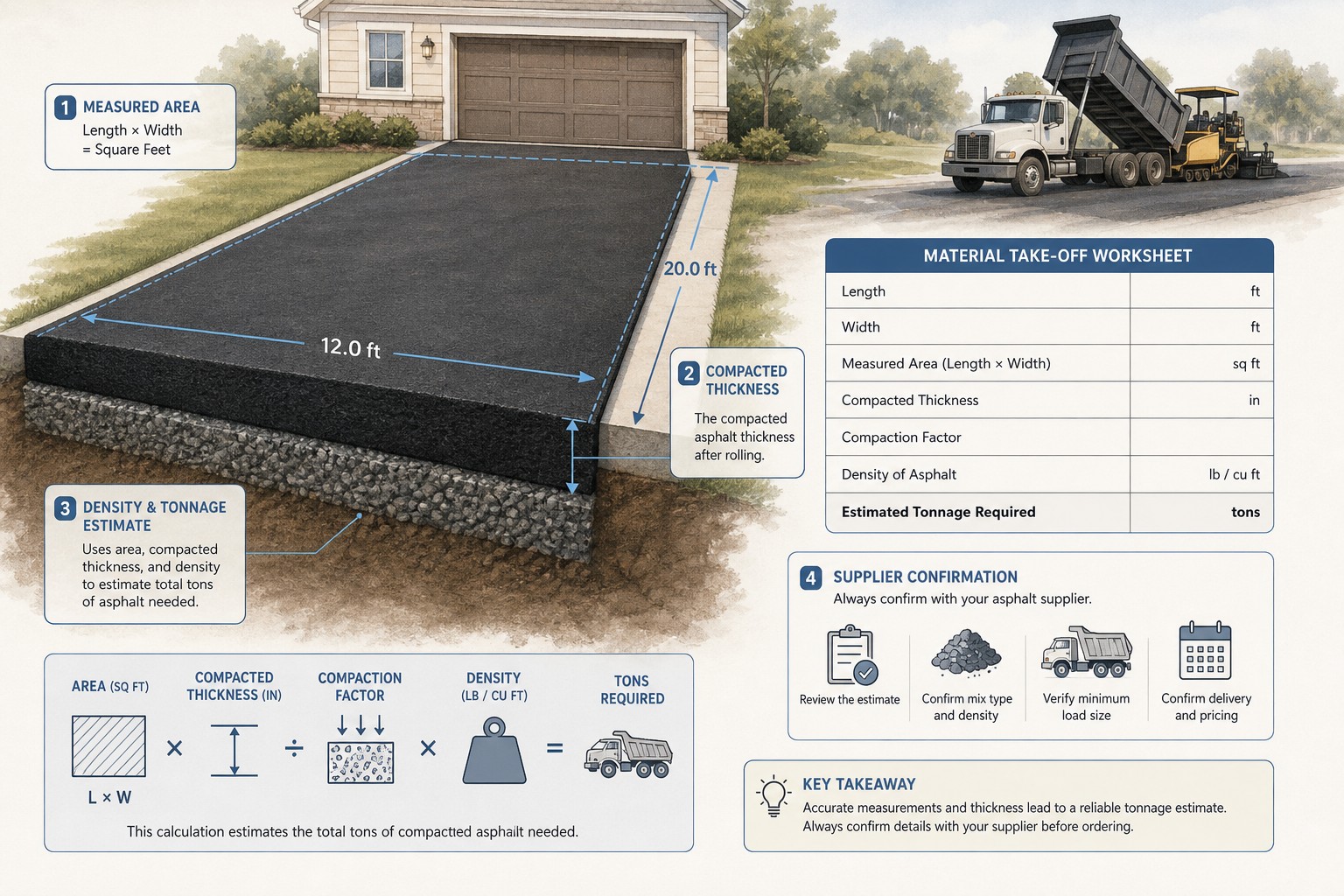
Illustration of a measured rectangular asphalt paving area, a depth measurement, and a paving quantity worksheet with volume and tonnage checks.
A reliable asphalt quantity begins with the measured finished area and documented thickness; density and delivery are separate supplier checks.
Transparent calculator

Check the method before you use the estimate

This page documents the formula, assumptions, and any specific external sources used for this tool.

See the method
Planning estimate What this result can and cannot tell you

Planning quantity estimate only. Confirm the measured paving limits, documented compacted thickness, exact mix and unit-weight basis, allowance, supplier sales unit, delivery terms, project requirements, and safe work plan with the responsible project parties before ordering or placing asphalt.

Read the full site disclaimer.

Found an error or unclear result? Tell us what happened so it can be investigated.
Calculator feedback

Report an issue with Asphalt Calculator

Your report is saved for the Octa Calculator team to review. Do not include sensitive financial, medical, or personal information.

This site is protected by reCAPTCHA and the Google Privacy Policy and Terms of Service apply.

Method & sources

How the Asphalt Calculator works

These notes describe the calculation used on this page and the assumptions that can change a real-world result.

Measured compacted volume, stated allowance, and editable-density tonnage Net volume (ft³) = length (ft) × width (ft) × [entered thickness (in) ÷ 12]; adjusted short tons = net volume × (1 + allowance) × entered density (lb/ft³) ÷ 2,000.

Assumptions on this page

  • The calculator converts the entered length and width to feet, assumes one rectangular zone, and converts the entered thickness from inches to feet before calculating volume.
  • Thickness is an input chosen outside this calculator. A project-type preset can change interface values, but it is not a pavement design or a thickness recommendation.
  • The prefilled 145 lb/ft3 density is an editable calculator input, not a permanent value for every asphalt mix. Confirm the tonnage basis for the exact mix with the plant or supplier.
  • The stated waste percentage is applied after the net geometric volume. It is a visible purchasing allowance, not a universal percentage or a substitute for resolving the paving scope.
  • The truck displays divide the calculated tons by fixed 7.5, 17.5, and 25-ton figures for rough scale only; they do not establish a vehicle, legal payload, delivery sequence, or supplier minimum. The optional cost uses only the price you enter.

Sources used on this page

Guide & Reference

Everything behind the Asphalt Calculator

Formulas, reference charts, and detailed answers — expand any section you need.

Read the results as separate planning checks

Displayed resultWhat the tool calculatesWhat it cannot confirm
Net volumeMeasured rectangular area multiplied by entered thicknessWhether the stated footprint and thickness are correct for the project
Allowance and adjusted tonsThe entered percentage applied after the net volume, then converted using entered densityWhether an allowance is needed or what purchasing condition justifies it
Cubic yards and cubic metresUnit conversions from adjusted cubic feetWhich sales unit the supplier will use for the actual mix
Truck-load displayCalculated tons divided by the tool's fixed comparison figuresTruck type, payload, legal loading, site access, delivery timing, or a supplier minimum
CostAdjusted tons multiplied by the price per ton you enterCurrent price, taxes, delivery, labour, or complete project scope

Worked calculator example: the supplied driveway preset arithmetic

This example shows the arithmetic used by the tool, not a recommendation for any driveway. Enter a 40 ft by 12 ft rectangle, choose an already documented thickness of 3 in, leave the calculator density at its prefilled 145 lb/ft³, and use a stated 5% allowance.

  1. Area: 40 × 12 = 480 sq ft.
  2. Thickness in feet: 3 ÷ 12 = 0.25 ft.
  3. Net volume: 480 × 0.25 = 120.0 ft³.
  4. Adjusted volume: 120.0 × 1.05 = 126.0 ft³, or 4.67 yd³.
  5. Weight: 126.0 × 145 = 18,270 lb.
  6. U.S. short tons: 18,270 ÷ 2,000 = 9.14 short tons.

If the project uses another mix basis, density, thickness, or allowance, that number changes. The calculation is useful because those changes are explicit; it does not validate the underlying project decisions.
What this Asphalt Calculator is calculating

This calculator turns one rectangular paving zone into geometric volume, then converts that volume into a U.S. short-ton estimate using the density you enter. It deliberately keeps the inputs separate: measured length and width, documented compacted thickness, selected allowance, and editable density. That makes the result easier to review when a drawing, mix, or quote changes.

The tool is not a pavement design program. It does not determine a suitable thickness, mix, base, drainage approach, grade, compaction plan, traffic capacity, or delivery arrangement. For the broader driveway takeoff process, read Asphalt Driveway Takeoff: Compacted Thickness and Tonnage. This page explains the calculator's own inputs and outputs without turning them into construction instructions.

Measure one consistent paving zone at a time

Enter length and width for an area that has one consistent finished thickness. The calculator converts the selected units to feet, so the core geometry is:

Net compacted geometry
Area (sq ft) = length (ft) × width (ft)
Net volume (ft³) = area (sq ft) × thickness (in) ÷ 12

When a paving shape changes width, has a separate turn pad, contains a different layer thickness, or otherwise cannot be described by one rectangle, calculate each clearly measured piece on its own and add the results in your worksheet. Use the Square Footage Calculator as a separate geometry check when useful. Do not force unlike areas into a made-up average width or thickness merely to make one calculator run.

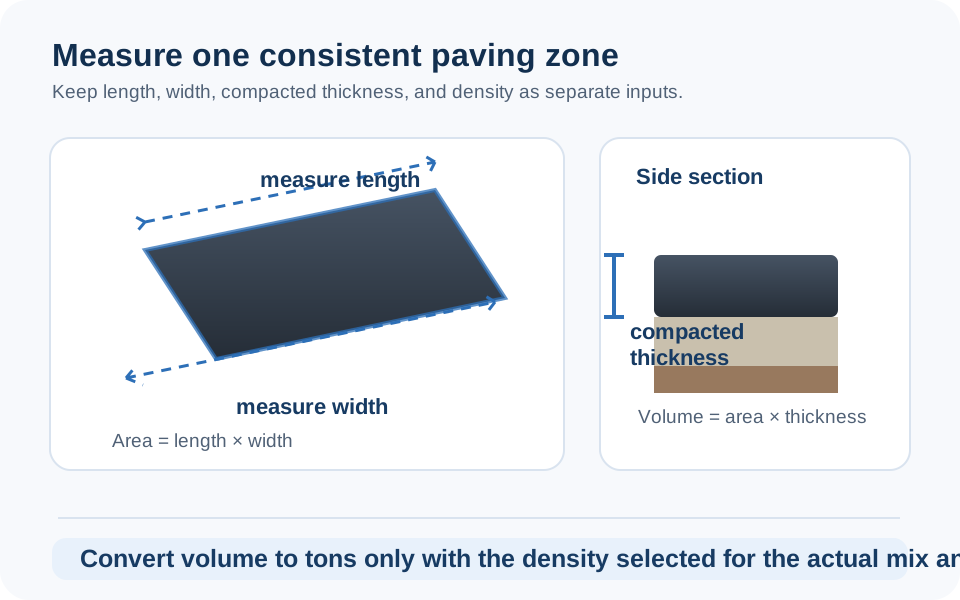
Diagram showing a rectangular paving area measured by length and width with a separately entered compacted asphalt thickness.
Calculate areas with different widths or thicknesses as separate zones instead of hiding them in one average.

Density turns a volume into a tonnage estimate

The calculator first calculates adjusted volume, then multiplies it by the entered density:

Editable-density weight conversion
Weight (lb) = adjusted volume (ft³) × entered density (lb/ft³)
Short tons = weight (lb) ÷ 2,000

The prefilled 145 lb/ft³ value is a starting input in this interface, not a claim that every asphalt mix has that density. The Asphalt Institute's engineering FAQ uses the same kind of volume-to-weight calculation while showing that density belongs to the mix and conditions being considered. Get the current tonnage basis for the exact material from the plant, supplier, or responsible paving party before treating the number as an order.

Keep asphalt, aggregate, and excavation as different quantities

Asphalt volume describes only the surface material represented by the selected finished area and thickness. It should not be reused as an aggregate-base or excavation quantity just because the same project has those layers. Calculate a separately specified aggregate quantity with the Gravel Calculator, removed material with the Excavation Calculator, and compare units with the Cubic Yard Calculator.

This separation is more than bookkeeping. Different materials can have different footprints, thicknesses, densities, supplier units, and delivery conditions. A transparent takeoff preserves those differences instead of giving one number false authority over the entire paving scope.

Make the thickness check explicit

Thickness is the lever that most strongly changes a fixed-area estimate. Before accepting the tonnage, write the area and the compacted or specified thickness beside the result, then repeat the calculation if the project has a transition, taper, patch, or edge with a different thickness. For example, do not average a narrow six-inch repair into a broad two-inch overlay unless the resulting average represents a documented quantity takeoff. Calculate the distinct zones first and add their material estimates afterward.

This page converts the thickness you enter to feet before it calculates volume, so an incorrect unit can create a large error. A quick sanity check is to double the thickness while holding area and density constant: the calculated volume and mass should also double. If they do not, recheck the unit selector and density entry before requesting a quote. The supplier's current mix information, sales unit, and project documents remain the basis for an order.

Final supplier check and calculator limits

Before ordering, save the measured dimensions, selected thickness, net cubic volume, stated allowance, density source, mix description, quote date, price basis, and the supplier's actual sales unit. Compare them with the current quote before scheduling delivery. A truck-equivalent line on this page is only a scale display; it must not be used as a delivery instruction.

The calculator cannot resolve pavement design, site conditions, drainage, mix selection, placement, compaction, permits, or safe work practices. Keep it as a transparent quantity check and report an issue or unclear result if its arithmetic, defaults, or explanation needs review.

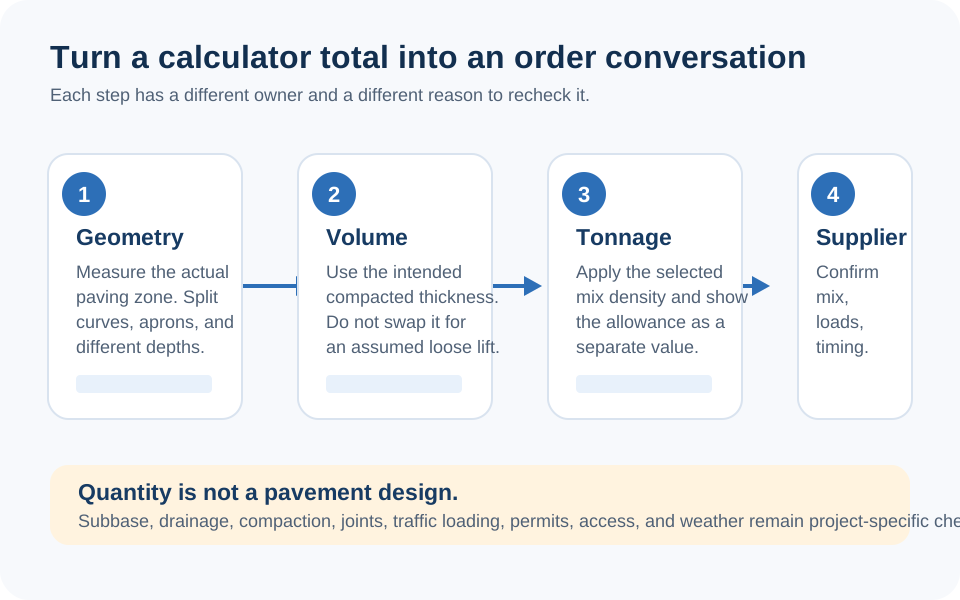
Order-check diagram separating measured asphalt volume, a stated allowance, the chosen mix density, a supplier's sales unit, and delivery confirmation.
Geometry, allowance, density, and delivery are different inputs. Keep all four visible before treating the result as an order.
FAQ

Frequently Asked Questions

How does the Asphalt Calculator calculate tons?
It converts your length and width to feet, multiplies the area by entered thickness in feet, applies the allowance percentage, multiplies by the density you enter, and divides the resulting pounds by 2,000 to show U.S. short tons.
Does the 145 lb per cubic foot value apply to every asphalt mix?
No. It is an editable starting value in this calculator. Confirm the tonnage basis for the exact mix and conditions with the plant, supplier, or responsible paving party before ordering.
Does this calculator tell me what asphalt thickness to use?
No. Thickness is an input to the volume calculation, not a recommendation. Use a documented project thickness and recalculate if that input changes.
Are the truck-load results a delivery plan?
No. The display divides the calculated tons by fixed comparison figures only. Confirm the actual vehicle, payload, legal loading, supplier minimums, access, and delivery sequence directly with the supplier or carrier.
How should I calculate an irregular paving shape?
Break it into clearly measured zones with one consistent width and thickness, calculate each zone separately, then add the results. Do not hide known changes inside one unexplained average.
Does the allowance replace measuring a separate wider or thicker area?
No. Calculate every known change in footprint or thickness as its own geometric zone. Use the allowance only for a separate, explainable purchasing reason.
Can I use the asphalt volume as an excavation or gravel quantity?
No. Those are separate materials with their own dimensions, conditions, and supplier units. Calculate them from their own documented footprints and thicknesses.
Is the optional price result a supplier quote?
No. It only multiplies the adjusted tons by the price per ton you enter. It does not include current pricing, taxes, delivery, labour, or the complete project scope.

Related Calculators

Explore all Construction calculators →