
Take-Home Pay Calculator
Build an editable gross-to-net salary scenario with income-tax, social-contribution, pension, local-tax, and other deduction assumptions.
Example Scenarios
£50k UK
Monthly • UK preset rates
UAE Tax-Free
120k • 0% income tax
€28/hr Germany
40 hrs/wk • hourly mode
Compare Offers
UK vs higher gross abroad
Salary Details View Results
Planning estimates: edit rates to match your situation. Convert gross pay between frequencies with the Salary Calculator. United States federal & state taxes? Use the US Paycheck Calculator.
Salary Summary
Gross vs Net: Where Every Pound Goes (annual)
Per Paycheck vs Annual Breakdown
| Item | Per Period | Annual |
|---|---|---|
| Gross | £0 | £0 |
| Employee pension / salary sacrifice | £0 | £0 |
| Income Tax | £0 | £0 |
| Social / NI | £0 | £0 |
| Other & Post-Tax | £0 | £0 |
| Net Take-Home | £0 | £0 |
Pension +1% Impact
Raise pension by 1% to see the net-pay effect…
How This Is Calculated
Order of operations: Gross → Pre-tax (employee pension/salary sacrifice + other) → Taxable income → Income tax + local tax → Social on gross → Post-tax → Net. This model subtracts only employee-funded contributions; it does not subtract employer-paid benefits such as Australian Super Guarantee. Social contributions are applied to gross in this simplified model; edit rates for your country. Planning estimates only. Not tax advice.
Check the method before you use the estimate
This page documents the formula, assumptions, and any specific external sources used for this tool.
See the methodPlanning estimate What this result can and cannot tell you
This calculator is an educational estimate, not financial advice, tax advice, legal advice, credit advice, investment advice, immigration advice, or payroll advice. Use official local guidance, a payslip, and a qualified professional where needed.
How the Take-Home Pay Calculator works
These notes describe the calculation used on this page and the assumptions that can change a real-world result.
Pre-tax deductions = gross pay x entered employee-pension/salary-sacrifice percentage + other entered pre-tax amount. Taxable income = gross pay - pre-tax deductions. Net pay = gross pay - pre-tax deductions - entered income tax - entered local tax - entered social contribution - entered post-tax deductions.
Assumptions on this page
- Country presets are editable starting assumptions, not complete or current tax tables and not a payroll calculation for a particular person.
- Income tax and local tax are calculated from the simplified taxable-income amount; social contributions are calculated from gross pay in this model.
- For Australia, the preset uses 0% employee pension. Compulsory Super Guarantee is an employer contribution outside this take-home model; enter a pension percentage only for a genuine employee salary-sacrifice contribution.
- Hourly mode annualizes the entered weekly regular and overtime hours across 52 weeks, so seasonal work and irregular schedules need their own adjustment.
Sources used on this page
- OECD Taxing Wages Used for context that tax burdens vary by country and household circumstances; it is not used as a source for this tool's editable presets.
- IRS Tax Withholding Estimator Linked as an official alternative for US federal withholding questions that require more individual detail than editable percentage inputs.
- Australian Taxation Office: Super guarantee Used to distinguish compulsory employer Super Guarantee from an employee salary-sacrifice deduction. The ATO states a 12% SG rate from 1 July 2025; the editable Australian preset therefore defaults employee pension to 0%.
Everything behind the Take-Home Pay Calculator
Formulas, reference charts, and detailed answers — expand any section you need.
An editable scenario, not a universal payroll table
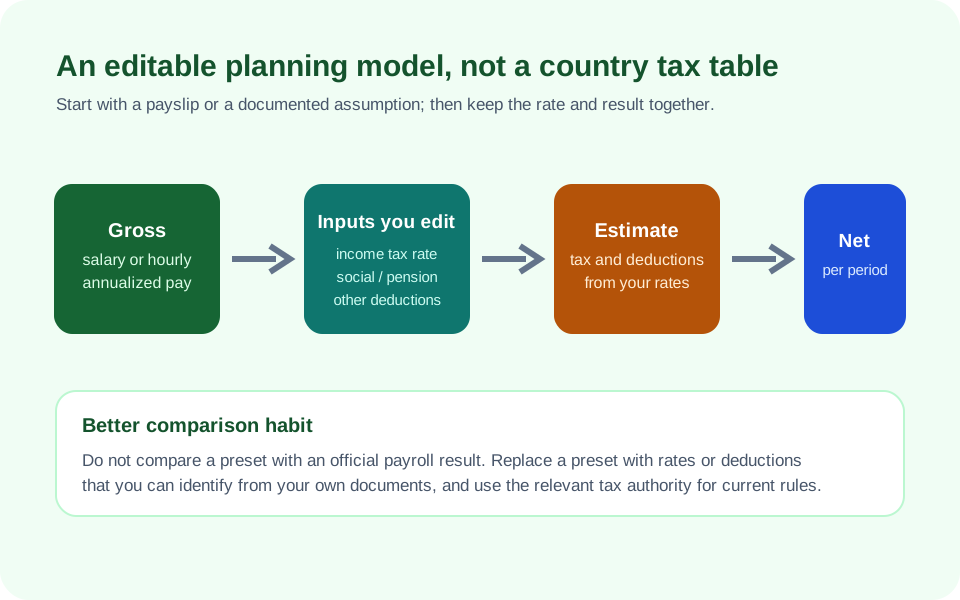
Gross-to-net pay looks simple until the rules behind a payslip are considered. Tax residency, household status, allowances, social-insurance caps, benefits, employer contributions, local rules, and currency can all change the result. This page therefore treats its country selections as editable starting assumptions. It does not claim that a displayed percentage is the current legal payroll rate for everyone in a country, and it does not submit a tax calculation or create a filing result.
Use the calculator to make the assumptions visible. Replace every tax, social-contribution, pension, local-tax, and other-deduction field with figures from a paystub, official calculator, offer letter, or other source you understand. For a US employee who needs a separate federal and state annualized model, use the US Paycheck Calculator. For a conversion between annual salary and hourly wage before tax assumptions, use the Salary Calculator.
The calculation order is deliberately visible
The model first finds gross annual pay. It calculates pre-tax deductions from the entered percentage and fixed annual amount, then subtracts them to create its simplified taxable-income figure. It applies the entered income-tax and local-tax percentages to that figure. It applies the entered social-contribution percentage to gross pay, subtracts fixed post-tax deductions, and divides the annual result by the selected pay periods.
This order is a model, not a universal legal order of operations. In a real system, a pension contribution may be an employer cost, a salary sacrifice, a tax-relieved employee deduction, or a post-tax deduction. A social contribution may have thresholds or caps. By showing each input and each deduction category, the calculator makes it easier to match the scenario to a document and identify where the simplified structure stops fitting.
For Australia, compulsory Super Guarantee is an employer contribution, not a deduction from the employee's take-home pay in this model. The ATO states that the SG rate is 12% from 1 July 2025. The Australian preset therefore starts the employee-pension field at 0%; enter a percentage only for a genuine employee salary-sacrifice contribution.
A worked example with only entered assumptions
Suppose you enter annual gross pay of 60,000 in your chosen currency, a 5% pre-tax pension deduction, 20% income tax, 2% local tax, 7% social contribution, and no fixed deductions. The pre-tax deduction is 3,000, leaving a modeled taxable-income amount of 57,000. The model then subtracts 11,400 of entered income tax, 1,140 of entered local tax, and 4,200 of entered social contribution. The resulting annual net is 40,260 before any post-tax deductions.
The arithmetic is reproducible, but the percentages are not a recommendation or a legal conclusion. If a payslip shows different categories, revise the inputs and note why. If an amount is an employer-paid benefit rather than a deduction from employee pay, do not subtract it simply because the label sounds similar. That distinction can materially change an offer comparison.
Pay frequency is a division, not a tax rule
Once the page has an annual net amount, it divides by 52 weekly, 26 biweekly, 24 semi-monthly, or 12 monthly periods. Semi-monthly and biweekly should not be treated as interchangeable: semi-monthly produces two scheduled payments in every month, while biweekly commonly creates 26 payments in a year. A monthly budget based on a biweekly paycheck should account for the two months that can include a third paycheck.
The page does not simulate a payroll calendar, a particular payment date, or one-off withholding. To turn the annual net scenario into categories for spending, emergency savings, and debt payments, connect it to the Budget Calculator. Keep the pay-frequency assumption next to the budget so a later change in schedule does not appear as an unexplained change in income.
Hourly mode explains its annualization assumption
Hourly mode estimates annual gross pay as regular hourly rate times regular hours per week times 52, plus overtime hourly rate times overtime hours per week times 52. The overtime hourly rate is the entered rate multiplied by the entered overtime multiplier. That approach is useful for a stable weekly schedule. It is less reliable for seasonal schedules, unpaid leave, varying shifts, bonuses, commission, tips, or work that is not performed every week of the year.
For example, an hourly rate of 25 with 40 regular hours and 5 overtime hours per week at a 1.5 multiplier produces an annualized gross assumption of 61,750: 25 x 40 x 52 plus 25 x 1.5 x 5 x 52. Before applying editable tax rates, confirm the hours and multiplier with the contract, collective agreement, local law, or employer records that govern the work.
Compare offers carefully across locations
An offer comparison is more useful when it separates pay from cost of living, tax treatment, benefits, and exchange-rate timing. This calculator can show two transparent gross-to-net scenarios, but it cannot decide whether the figures are comparable across countries or cities. Use the same currency only after deciding what exchange rate and date you are using, then record which retirement, healthcare, relocation, bonus, and tax-residency assumptions sit outside the fields.
The OECD's Taxing Wages work illustrates why household and jurisdiction details matter. It should not be read as a substitute for a local calculation. The cleanest comparison is often a range: one conservative set of entered rates, one optimistic set, and a separate note of items not modeled.
Check the model against the right record
For an established job, compare the calculator to a current payslip and change only one input at a time until the categories are understandable. For a new role, ask whether pension, insurance, payroll taxes, commissions, stock, bonus withholding, and local taxes are employee deductions or employer costs. For US federal withholding, the IRS Tax Withholding Estimator is an official tool that gathers more individual detail than this generic page.
If you see an incorrect formula, confusing label, or inaccessible result, use the page's Report an issue control. Include non-sensitive inputs and the observed output so the calculation can be reproduced. Do not submit tax identification numbers, bank data, employment logins, or a full payslip image.