
Retirement Calculator
Estimate a retirement savings scenario from the current age, retirement age, savings, contributions, spending goal, other income, return, inflation, withdrawal-rate, and plan-age inputs you choose. It is a planning model, not a retirement recommendation or benefit estimate.
Example Scenarios
Early Saver
Age 30 • $50k/yr goal
Mid-Career
Age 45 • $60k/yr goal
Near Retirement
Age 58 • $72k + SS
Lean FIRE
Retire 60 • 3.5% rule
Retirement Plan View Results
Retirement Summary
Balance Over Time
Alternative Model Inputs to Test
Retirement Age Sensitivity
| Retire At | Projected Savings | Needed | Gap |
|---|
Year-by-Year Projection
| Age | Contributions | Growth | Withdrawals | Balance |
|---|
How This Is Calculated
Retirement number uses Spending ÷ Withdrawal Rate after inflating spending to retirement year; savings grow with FV = PV(1+r)n + PMT · [((1+r)n − 1) / r]:
Check the method before you use the estimate
This page documents the formula, assumptions, and any specific external sources used for this tool.
See the methodPlanning estimate What this result can and cannot tell you
Educational retirement scenario only. This calculator does not estimate government benefits, guarantee that savings will last, recommend a withdrawal rate, investment return, retirement date, contribution, account, or allocation, and is not financial, tax, legal, or investment advice. This is not financial advice.
How the Retirement Calculator works
These notes describe the calculation used on this page and the assumptions that can change a real-world result.
The calculator inflates the entered annual spending to the planned retirement date, subtracts entered other income, and divides the resulting annual gap by the entered withdrawal rate to create a planning target. It projects savings using the entered contributions, pre-retirement return, retirement return, inflation, retirement age, and plan-to age.
Assumptions on this page
- Every age, savings, contribution, spending, other-income, return, inflation, withdrawal-rate, and plan-age input is a user-selected planning assumption.
- The withdrawal rate is a denominator supplied by the visitor; the calculator does not determine a safe or appropriate rate, retirement date, spending level, or contribution amount.
- Returns and inflation are modeled as constant assumptions inside the scenario. Actual market performance, prices, taxes, benefits, longevity, and withdrawals can vary materially.
- The result excludes account fees, tax treatment, required distributions, benefit-claiming rules, health and care costs, estate goals, changing contribution limits, and all plan-specific terms unless reflected in the inputs.
Sources used on this page
- U.S. Securities and Exchange Commission: Investor.gov Ballpark Estimate Supports treating retirement savings math as an estimate built from savings, earnings, and income assumptions rather than a guarantee.
- U.S. Securities and Exchange Commission: Investor.gov Free Financial Planning Tools Supports using retirement, savings-goal, and compound-interest planning tools with explicit assumptions; it does not endorse a withdrawal rate or investment return.
Everything behind the Retirement Calculator
Formulas, reference charts, and detailed answers — expand any section you need.
Retirement math starts with a spending gap, not a magic number
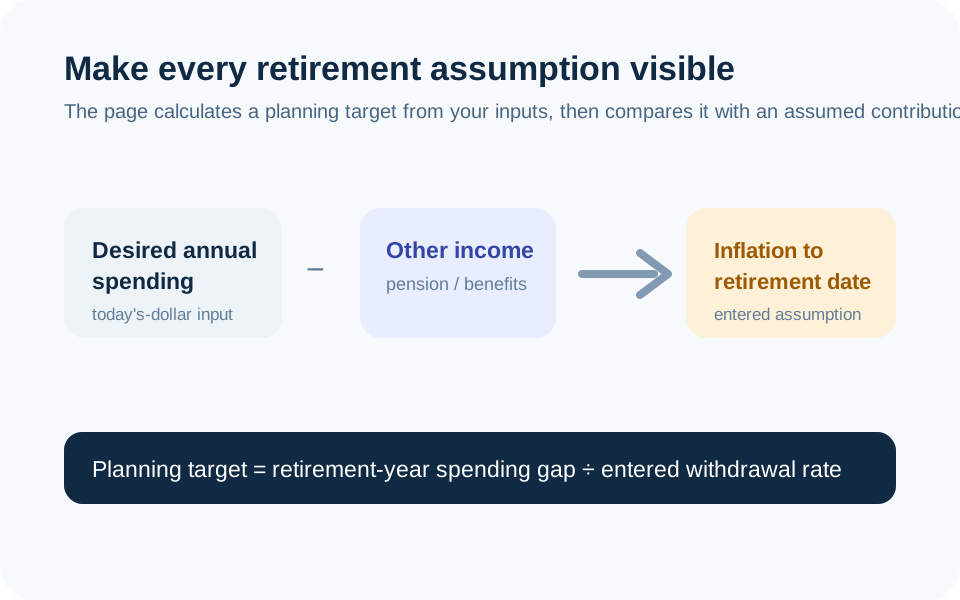
This calculator begins with the annual spending amount you enter in today’s dollars. It adds your inflation assumption through the planned retirement date, subtracts any other monthly income you enter, and divides the remaining annual spending gap by the withdrawal rate you enter. The result is a planning target for that exact scenario.
No single retirement number works for every person. Changing the retirement date, income source, spending amount, inflation assumption, or withdrawal rate changes the arithmetic. The page should make those inputs easy to challenge, because a model that hides them can look more certain than it is.
Work one simple target calculation by hand
Before an inflation adjustment, if a scenario has $48,000 of annual spending and $12,000 of other annual income, the annual gap is $36,000. With a user-entered 4% withdrawal-rate assumption, $36,000 ÷ 0.04 = $900,000. That is not a recommendation to use 4%, an assurance that $900,000 will be sufficient, or a forecast of expenses. It is simply the visible division that the model performs.
The page then adds the age and inflation assumptions. The retirement-year spending gap can be larger or smaller than the today-dollar illustration, and the result changes when you change a rate or date. Use the diagram to trace that chain instead of accepting one headline result.
Why the projected savings line can move sharply
Before retirement, the calculator grows the entered current savings and contributions using the return assumption you choose. During retirement, it applies the separate retirement return, spending withdrawals, other income, inflation, and plan-to age. A difference in any one assumption can change the displayed balance path, especially over a long time horizon.
The U.S. Securities and Exchange Commission describes retirement planning tools as estimates built from assumptions. That is the right framing here. The modeled “money lasts until” result is not a promise that an account will support a real withdrawal plan; it is the output of the selected assumptions and sequence.
Use sensitivity questions instead of a single certainty
Try changing one input at a time. Keep savings, contribution, and planned retirement age constant; then test a different return or inflation assumption. Next, restore those values and adjust only the spending goal or other income. This makes it clear which assumption is doing the work in the result.
Do not interpret the “required monthly” field as a personalized savings instruction. It is the deposit that closes the model’s gap under its current rates and dates. Account limits, taxes, employer matching, benefits, debt, emergency savings, health costs, and risk tolerance can all change a real plan. Use the Investment Calculator for a narrower contribution-growth scenario and the Savings Goal Calculator for a date-and-deposit question.
Other income needs a source outside this calculator
Enter only income figures you can explain and revisit. A pension estimate, government-benefit estimate, rental income, or part-time work assumption can have eligibility rules, taxes, indexing, timing, and uncertainty that this page does not verify. The calculator simply subtracts the monthly amount you supply from the spending gap in the scenario.
Keep a record of the source date and terms behind each number. For household spending inputs, start with a current plan in the Budget Calculator. If the retirement scenario is important to a decision, confirm benefit and account details with the relevant provider and obtain appropriately qualified advice.
Build an assumption ledger before treating the gap as meaningful
Write down the origin and date of each major input: current account balance, planned contribution, spending estimate, other income estimate, return assumptions, inflation assumption, withdrawal rate, retirement age, and plan-to age. If an input is only a rough placeholder, mark it that way. A transparent list makes the projection easier to revise when a provider updates a benefit estimate, expenses change, or a contribution becomes unavailable.
Run at least one alternate scenario rather than relying on the most comfortable output. Alter one input at a time and observe whether the model is primarily driven by spending, time, return, or withdrawal assumptions. This does not create certainty; it reveals which unknowns deserve the most careful real-world verification.