
Debt Avalanche Calculator
Estimate a highest-APR-first debt payoff sequence from your entered balances, annual percentage rates, minimum payments, and total monthly budget. Review the monthly assumptions before using the result for any financial decision.
Example Scenarios
$19,400 Debt Load
Four debts · $700/mo budget
Late First Win
High-APR outlier · patience flag
$2,000 Lump Sum
One-time extra in month 1
Your Debts View Results
Avalanche Results
Payoff Order by Rate
Interest Destruction vs Minimums
—
Avalanche vs Snowball on Your Debts
| Avalanche | Snowball | |
|---|---|---|
| Debt-free in | — | — |
| Total interest | — | — |
—
Balance Timeline
Month-by-Month Plan
How This Is Calculated
Each month interest accrues at rate ÷ 12 on every balance. Minimums go to all debts; everything left in your budget attacks the highest APR. When a debt zeroes, its payment rolls into the next highest rate and the attack payment grows.
Check the method before you use the estimate
This page documents the formula, assumptions, and any specific external sources used for this tool.
See the methodPlanning estimate What this result can and cannot tell you
Educational estimate only. A highest-rate-first calculation is not individualized financial, credit, legal, or debt-settlement advice. Confirm actual account terms and payment obligations with each creditor before acting. This is not financial advice.
How the Debt Avalanche Calculator works
These notes describe the calculation used on this page and the assumptions that can change a real-world result.
Each modeled month adds balance × APR ÷ 12 to every unpaid debt, pays entered minimums, then applies the remaining debt budget to the active debt with the highest entered APR. When a balance reaches zero, the available payment rolls to the next-highest APR.
Assumptions on this page
- Annual percentage rates, balances, and minimum payments are user-entered snapshots. The calculator assumes they remain unchanged through the payoff sequence.
- The monthly budget is a user-entered amount; the calculator does not determine whether it is safe, affordable, or contractually sufficient.
- Interest accrues monthly in the model before payments. Actual daily-balance calculations, payment due dates, fees, and allocation policies can differ.
- The result excludes new borrowing, late fees, tax effects, credit-score effects, settlement terms, and changes in lender policies.
Sources used on this page
- Consumer Financial Protection Bureau: How to reduce your debt Supports the description of minimum payments, smallest-balance snowball ordering, highest-rate ordering, and rolling a freed payment into the next debt.
Everything behind the Debt Avalanche Calculator
Formulas, reference charts, and detailed answers — expand any section you need.
What “highest rate first” means in this calculator
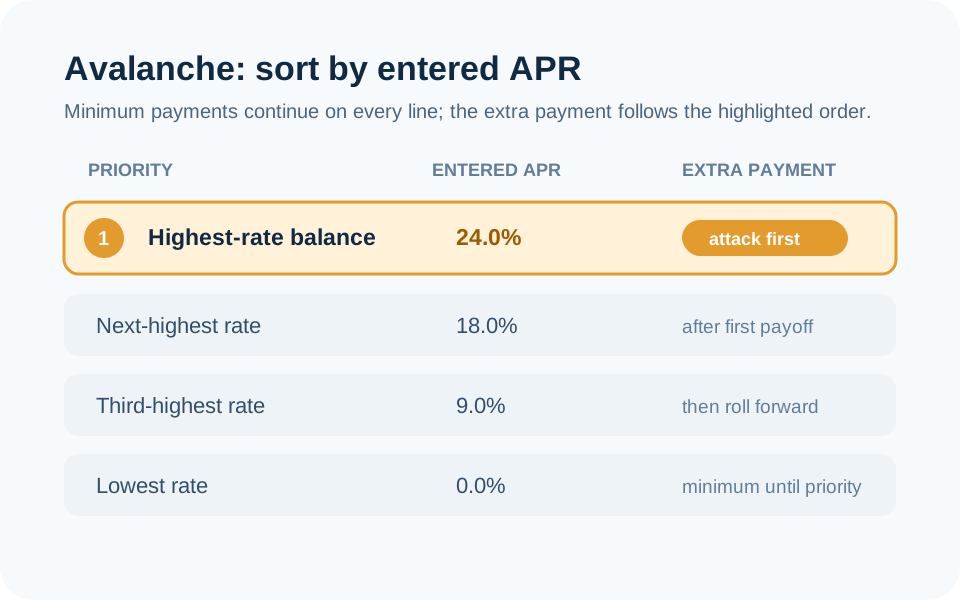
The debt avalanche method is a priority order, not a new kind of loan. The page sorts the debts you enter by APR, keeps the entered minimum payment in the sequence for every active debt, and directs the unused part of the total monthly budget to the highest APR. After that balance reaches zero, its released payment capacity becomes part of the amount available for the next-highest APR.
The important word is entered. The page does not retrieve live balances, card agreements, promotional terms, or payment due dates. Enter those numbers from current account information and rerun the estimate when they change.
The monthly math behind the payoff order
For each modeled month, the calculator first adds interest: balance × APR ÷ 12. It then applies the minimums and sends the remaining budget to the top-ranked APR. This sequence is repeated until the balances are paid in the model. A debt with a 24% APR is therefore sorted ahead of one with a 12% APR even if the latter has a smaller balance.
Suppose two debts have $2,000 at 24% APR and $1,000 at 8% APR. Their modeled first-month interest is $40.00 and about $6.67 respectively before payments. If the monthly budget exceeds both minimums, the surplus is assigned to the 24% debt first. This illustrates the ordering; your actual statement calculation may use daily balances, different payment timing, fees, or rates.
Why the calculator also shows snowball
Avalanche and snowball are worth comparing only when they use the same balances, APRs, minimums, and monthly budget. Snowball uses the smallest balance as its priority instead of the highest APR. The model can show a different first payoff date and a different total interest estimate because the ordering changes.
Use the dedicated Debt Snowball Calculator when you want to inspect the smallest-balance sequence in detail, or use Debt Payoff Calculator compare mode to see both plans side by side. The strategy comparison guide explains what remains constant across the two calculations.
Check the account terms that can change the plan
The page’s interest estimate is deliberately simpler than an account statement. It does not know a daily periodic rate, statement close date, payment posting time, annual fee, late fee, promotional balance transfer, deferred-interest trigger, or a creditor’s allocation rule when several balances share one account. It also does not model new purchases.
That means a sensible review list is short but specific: record the current APR for each balance type, the required minimum for this statement, any promotional end date, and whether a payment must be received rather than merely sent by a certain date. If the total of required minimums is difficult to meet, contact the creditor or an appropriate nonprofit credit counselor before relying on a reordered payment plan.
Use the result as a change detector
An avalanche result is most useful when you rerun it after a material change: a rate reset, a balance transfer, a paid-off account, a new required payment, or a changed monthly budget. Compare the new payoff order and total modeled interest with the last scenario instead of assuming a prior finish date still applies.
For cash-flow context, pair it with the Budget Calculator and, where a credit-card balance is involved, the Credit Card Payoff Calculator. These tools organize arithmetic; they do not replace the lender’s current disclosure or individualized advice.
Keep the priority list tied to current statements
The APR order can change when an introductory rate expires, a balance transfer has its own rate, or a creditor changes the account terms. Recheck every entered line rather than carrying a prior sort order into a new month. A lower balance at a higher APR can become the first priority in the model, while a low-rate installment loan may remain behind it even if its payment is larger.
Keep a small input ledger with the statement date, balance type, APR, minimum, and next due date. The calculator does not store or verify that information. A transparent ledger lets you identify whether a changed payoff result comes from a rate, a balance, a payment budget, or the strategy itself, and avoids treating a generic ordering rule as a substitute for current terms.