
Emergency Fund Calculator
Estimate an emergency-cash target from the essential monthly expenses, coverage months, current savings, monthly contribution, and APY you enter. The result is a planning scenario, not a universal rule or an investment recommendation.
Example Scenarios
Spec Example
$2,700/mo • 6 mo • $400/mo save
Starter Fund
$1,900/mo • 3 mo • building up
Variable Income
$3,400/mo • 9 mo • commission
Self-Employed
$4,000/mo • 12 mo • $12k saved
Emergency Fund Plan View Results
Your Emergency Fund at a Glance
Coverage Progress
Funding Milestones
Itemized Essentials
| Category | Monthly |
|---|---|
| Total Essentials | $0 |
Funding Timeline
Month-by-month balance with monthly deposits and APY compounding until fully funded.
| Month | Deposit | Interest | Balance |
|---|
How This Is Calculated
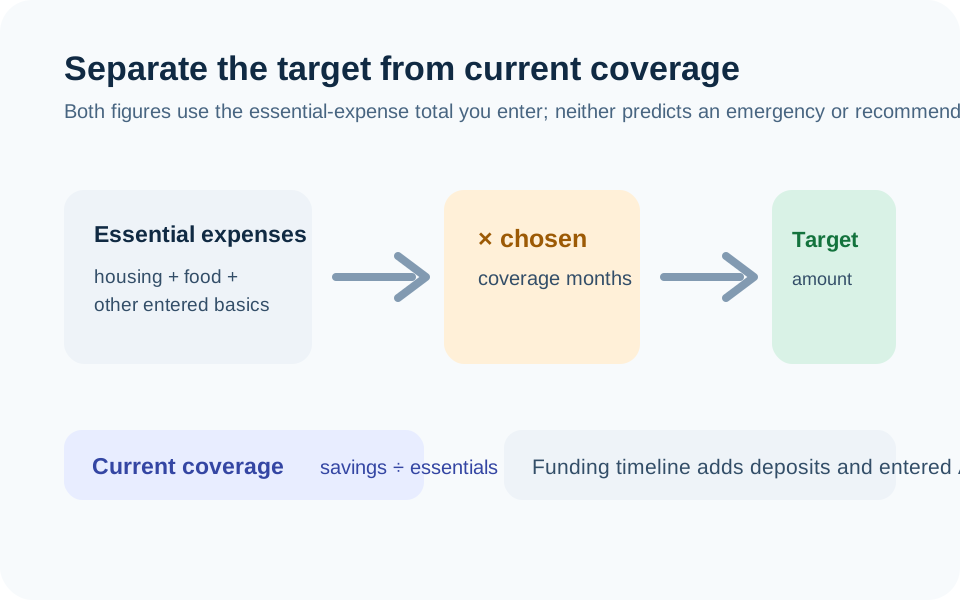
Target = essential monthly expenses x months of coverage. Current coverage = current savings / essentials. Funding timeline compounds your APY monthly with end-of-month deposits until the target is reached.
Check the method before you use the estimate
This page documents the formula, assumptions, and any specific external sources used for this tool.
See the methodPlanning estimate What this result can and cannot tell you
Educational estimate only. This page does not recommend a particular cash-reserve amount or account. Review your own expenses, access needs, account terms, insurance coverage, and obligations before moving money or making financial decisions. This is not financial advice.
How the Emergency Fund Calculator works
These notes describe the calculation used on this page and the assumptions that can change a real-world result.
Target = sum of entered essential monthly expenses × selected months of coverage. Current coverage = current emergency savings ÷ entered essential monthly expenses. The funding timeline compounds the entered APY monthly and adds the entered monthly deposit.
Assumptions on this page
- The essential-expense list, coverage period, current savings, deposits, and APY are all user-entered planning assumptions.
- The calculator does not know the likelihood, timing, size, or type of an emergency and does not prescribe a universal number of coverage months.
- The APY is used only for a hypothetical funding timeline. Actual savings rates, compounding, account access, fees, and insurance coverage depend on the account terms.
- The calculation excludes taxes, investment losses, debt interest, benefit eligibility, insurance coverage, and withdrawals unless you change the inputs and rerun it.
Sources used on this page
- Consumer Financial Protection Bureau: An essential guide to building an emergency fund Supports defining emergency savings as money set aside for unplanned expenses and choosing a goal based on an individual situation.
Everything behind the Emergency Fund Calculator
Formulas, reference charts, and detailed answers — expand any section you need.
Define the emergency before you calculate it
An emergency fund is a cash reserve set aside for unplanned bills or loss of income, not a label for every goal. The Consumer Financial Protection Bureau notes that the amount a person needs depends on the situation. This calculator therefore asks you to choose both the essential monthly expenses and the months of coverage instead of inserting one “correct” target.
Start by deciding what your scenario must cover. Housing, utilities, food, insurance, transport, required debt payments, and care costs may be relevant. A restaurant budget, subscription, vacation fund, or planned renovation may be important to you but is usually a different planning line. The goal is a transparent assumption you can change, not a perfect generic list.
Target and current coverage are two different calculations
The target is simple: sum of entered essential monthly expenses × chosen coverage months. Current coverage is also simple: current emergency savings ÷ entered essential monthly expenses. If essentials are $3,000 per month and you choose six months, the modeled target is $18,000. If current savings are $4,500, current coverage is 1.5 months under that same definition.
Change either input and both numbers should change. That is a feature, not inconsistency: different expense definitions or different coverage choices create different scenarios. The tool is explicit about the multiplication so you can review the assumption rather than relying on a headline amount.
Read the funding timeline as a scenario
The timeline starts with the current savings amount you enter, compounds the stated APY monthly, and adds the monthly contribution you enter until the target is reached. It is useful for asking “what happens if I deposit this amount consistently?” It does not predict that your income, account rate, or expenses will stay unchanged.
For example, if the funding gap is $6,000 and you contribute $500 per month with a 0% rate, the arithmetic starting point is 12 months. With a stated APY, the timeline may be slightly shorter because the model adds interest. Confirm the rate, compounding, withdrawal restrictions, fees, and insurance coverage with the financial institution instead of treating an entered APY as permanent.
Avoid mixing emergency cash with every other goal
Keep the emergency scenario separate from a down payment, planned tax payment, tuition bill, holiday spending, or investment account. Those may need their own date and access assumptions. Separating the lines makes it clearer which funds are intended for an unplanned disruption and which are reserved for something expected.
For a date-driven goal, use the Savings Goal Calculator. For a complete cash-flow picture, use the Budget Calculator so a proposed monthly deposit is compared with the income and obligations you enter. The calculations should agree on the same monthly amount, but they answer different questions.
Questions the calculator cannot answer
The result cannot identify an appropriate number of months for you, determine whether you should pay debt before saving, assess an employer benefit, predict unemployment benefits, or select a bank account. It also does not distinguish between cash that is immediately accessible and money subject to market risk, withdrawal penalties, or account restrictions.
Use the result as a checklist: confirm what the expense total includes, why you chose the coverage period, where the money would be held, how quickly it could be accessed, and how the plan changes if income or essential costs move. If you find an error in the arithmetic, report it with non-sensitive example inputs through the page’s issue-report route.
Review the cash location as well as the amount
A target amount alone does not tell you whether the funds can be used when needed. Keep a separate note about where the cash would be held, how quickly it can be accessed, whether transfers have limits, whether a withdrawal could trigger a penalty, and what account terms apply. Those details are outside the math but can matter as much as the coverage number during an actual disruption.
Also distinguish current savings from money that is already committed to another bill or goal. Counting the same balance twice can make coverage look stronger than it is. If part of the balance is reserved for an imminent expense, exclude it or create a separate scenario. Recheck both target and coverage after a meaningful change in recurring essential expenses.