
Down Payment Calculator
Compare down-payment percentages with your own purchase price, fixed-rate mortgage assumption, property-tax and insurance inputs, modeled mortgage-insurance rate, closing-cost estimate, and savings timeline. Keep cash to close separate from the percentage you put down.
Example Scenarios
$400k Home
10% down • 7% • spec example
3.5% Down Illustration
3.5% down • $350k
20% Benchmark
No modeled insurance cost • $400k
Savings Plan
$10k saved • $1,200/mo
Down Payment Inputs View Results
Your Down Payment at a Glance
Down Payment Comparison (3% to 20%)
Click a row to select that down-payment level. The entered insurance illustration is modeled below 20% down, and the table shows the 80%-balance milestone through amortization. It does not predict cancellation or termination eligibility.
| Down % | Down $ | Loan | PITI/mo | Insurance (model) | 80%-balance milestone | Cash to Close |
|---|
How This Is Calculated
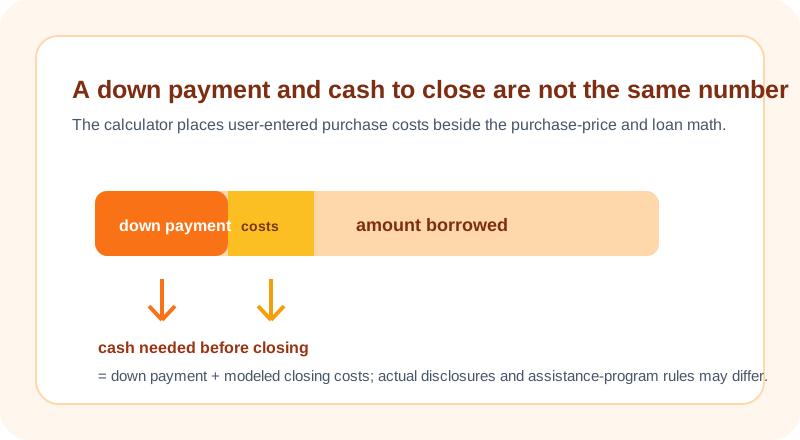
Down payment = home price × down %. Loan amount = price − down. Monthly P&I uses standard amortization. Property tax and insurance are spread monthly. The page applies your entered mortgage-insurance illustration to scenarios below 20% down and marks the payment where the modeled balance reaches 80% of the purchase price. Actual insurance rules are loan-specific. Cash to close = down payment + closing costs.
Check the method before you use the estimate
This page documents the formula, assumptions, and any specific external sources used for this tool.
See the methodPlanning estimate What this result can and cannot tell you
Educational down-payment and cash-to-close estimate only. This is not financial advice, a loan offer, program eligibility result, or tax calculation. Confirm actual loan requirements, assistance rules, lender fees, appraisal, taxes, insurance, mortgage insurance, and cash-to-close disclosures with the relevant provider before acting.
How the Down Payment Calculator works
These notes describe the calculation used on this page and the assumptions that can change a real-world result.
Down payment = home price * selected down-payment percent; loan amount = home price - down payment; modeled closing costs = home price * entered closing-cost rate; cash to close = down payment + modeled closing costs; principal-and-interest payment uses M = P * [r(1 + r)^n] / [(1 + r)^n - 1].
Assumptions on this page
- Purchase price, down-payment amount or percentage, rate, term, property-tax rate, insurance, mortgage-insurance rate, closing-cost rate, and savings inputs are entered by the visitor.
- The payment model assumes a fixed rate and equal monthly principal-and-interest payments. Taxes, insurance, and mortgage insurance are planning inputs, not quotes or lender disclosures.
- The modeled mortgage-insurance end point is a balance threshold within the schedule; actual insurance requirements, cancellation, and loan-product rules can differ.
- The result does not determine minimum down payment, program eligibility, assistance, approval, cash-to-close requirements, or suitability.
Sources used on this page
- CFPB: What are all the costs of buying a home? Used for the reminder that purchase costs include borrowing and real-estate costs beyond the listing price and down payment.
- HUD: Buying a Home Used for the reminder that down payment is only one affordability factor alongside income, monthly expenses, credit, and interest rate.
- CFPB: When can I remove private mortgage insurance (PMI)? Used for the limitation that this page's 80%-balance milestone is not an insurance cancellation or termination determination.
Everything behind the Down Payment Calculator
Formulas, reference charts, and detailed answers — expand any section you need.
A down payment is one input in a larger cash plan
The percentage you put down changes the amount borrowed, but it does not describe all of the cash required before closing. This calculator keeps the purchase price, down payment, user-entered closing-cost rate, property tax, insurance, mortgage-insurance assumption, rate, and term separate. That lets you compare the first cash need and the monthly-payment effect without calling any percentage universally right.
Use the page as a scenario worksheet. It does not know which program you qualify for, whether assistance is available, whether a seller credit applies, or what a lender will require. The CFPB's home-buying cost guidance is a useful reminder that a listing price is not the full purchase-cost picture. Keep reserves, moving costs, inspections, repairs, and local transaction expenses in a separate planning list.
How cash to close is modeled on this page
For each selected percentage, the calculator multiplies the home price by the percentage to find the down payment. It subtracts that amount from the price for the modeled loan amount. It separately multiplies the price by your closing-cost rate and adds that value to the down payment for a cash-to-close estimate.
The resulting loan amount is then used in a fixed-rate principal-and-interest payment calculation. Taxes, insurance, and modeled mortgage insurance are shown separately so they do not masquerade as part of the down payment.
Worked scenario: separate the monthly and upfront effects
Assume a $360,000 home price, a 10% down payment, and a 3% closing-cost input. The down payment is $36,000; modeled closing costs are $10,800; and modeled cash to close is $46,800. The loan amount is $324,000. At a fixed 6% annual rate for 360 months, the principal-and-interest payment is about $1,942.54 before property tax, insurance, HOA, or modeled mortgage insurance.
The example demonstrates two different questions. The $46,800 is a cash scenario; $1,942.54 is a loan-payment scenario. A larger down payment can lower the modeled loan balance, but it may require more cash. The calculator does not decide how much cash should remain available after a purchase.
Mortgage-insurance results are planning fields, not contract terms
If you enter a mortgage-insurance rate and select a percentage below the page's model threshold, the calculator adds a modeled monthly amount and projects the month in which the scheduled balance reaches its 80% value threshold. That is an arithmetic checkpoint in this calculation, not a claim about a particular product's insurance requirement or cancellation process.
Loan type, contract terms, payment history, property value, servicer process, and applicable rules can all matter. Do not use a projected month to stop a payment or assume a premium will change. Compare your actual loan documents and servicer information. The Mortgage Calculator shows the same cost components beside a full schedule for a chosen purchase scenario.
Saving timeline is a straight-line cash target
When you enter current savings and a monthly savings amount, the page calculates the gap between those funds and the selected cash-to-close scenario, then divides by the monthly savings rate. It rounds up to a whole number of months. That is a clear cash-flow calculation, not a return projection.
The timeline does not model interest earned, investment gains or losses, changes in home prices, price negotiations, assistance, income changes, emergency expenses, or a moving date. Use it to see the size of a target under your current saving pace. If you need an interest-bearing savings scenario, use the Savings Goal Calculator and make the rate and fee assumptions explicit there.
Build an honest cash-to-close checklist
- Choose a price and down-payment percentage from the same purchase scenario.
- Replace generic closing-cost assumptions with offer- or local-source information when available.
- Enter local property tax, insurance, HOA, and mortgage-insurance assumptions separately from the loan amount.
- Keep emergency reserves and non-closing expenses outside the down-payment field.
- Compare the page with the lender's official cash-to-close and payment disclosures before relying on it.
Use the Home Affordability Calculator to test the monthly payment against your own budget. Report any unclear formula or label through the issue form using non-sensitive sample figures only.