
Mortgage Payoff Calculator
Build a payoff schedule from the current balance, rate, remaining term, and payment you enter. Test an extra monthly amount, a modeled biweekly effect, a one-time lump sum, or a target payoff date while keeping the baseline schedule visible.
Example Scenarios
$200 Extra Monthly
$280k • 6.5% • 25 yr left
Biweekly Payments
13th-payment effect only
$20k Lump Sum Now
One-time principal hit
Target Payoff Date
Paid off by Jun 2046
Current Loan View Results
Your Payoff Plan
Balance Over Time
Strategy Comparison
| Metric | Current Schedule | Accelerated Plan |
|---|
Updated Amortization Schedule
Month-by-month schedule under your acceleration plan. For schedule-first analysis, see the Amortization Calculator.
| # | Date | Payment | Interest | Principal | Balance |
|---|
How This Is Calculated
Baseline schedule uses your current balance, rate, and remaining term. Accelerated schedule adds extra monthly payments, biweekly conversion (one extra payment per year), and any lump sum. Target date mode reverse-solves the extra payment needed.
Check the method before you use the estimate
This page documents the formula, assumptions, and any specific external sources used for this tool.
See the methodPlanning estimate What this result can and cannot tell you
Educational mortgage-payoff estimate only. This is not financial advice, tax advice, investment advice, or legal advice. Confirm the exact payoff amount, additional-payment instructions, timing, fees, and loan terms directly with the servicer before sending funds or changing a payment plan.
How the Mortgage Payoff Calculator works
These notes describe the calculation used on this page and the assumptions that can change a real-world result.
Interest_m = opening balance_m * monthly rate; principal_m = min(opening balance_m, scheduled payment - interest_m + modeled extra_m); closing balance_m = opening balance_m - principal_m.
Assumptions on this page
- The baseline schedule uses the current balance, annual rate, term, and payment entered. It assumes a fixed rate and one modeled monthly update per period.
- The biweekly option models the effect as one regular principal-and-interest payment divided by 12 and added to every month; it is not a bank-specific biweekly payment calendar.
- A lump sum is applied in the selected modeled month. Actual servicer posting, payment cutoffs, escrow, fees, and any loan-specific terms can change a real payoff amount or date.
- The optional payoff-versus-investment display projects only the return assumption entered; it is not an investment forecast or recommendation.
Sources used on this page
- CFPB: Mortgage servicer information and payoff requests Used for the reminder that mortgage statements identify principal, interest, escrow, and payment information, and that a servicer can provide payoff information.
Everything behind the Mortgage Payoff Calculator
Formulas, reference charts, and detailed answers — expand any section you need.
Start from the loan position you have today
A payoff estimate is most useful when it starts from the current principal balance and remaining repayment period rather than from the original purchase price. Enter the balance, annual rate, remaining term, and current principal-and-interest payment if you have it. The page builds a baseline schedule, then applies your extra-payment choices to a second schedule so you can see the difference in months and modeled interest.
This is a schedule model, not a payoff quote. Mortgage statements and servicer records can include escrow, fees, timing rules, or amounts not represented by a simple principal-and-interest balance. The CFPB explains that a mortgage statement identifies amounts applied to principal, interest, and escrow; use those records before entering a scenario. For a standard schedule without acceleration options, visit the Amortization Calculator.
How an extra amount changes a month in the schedule
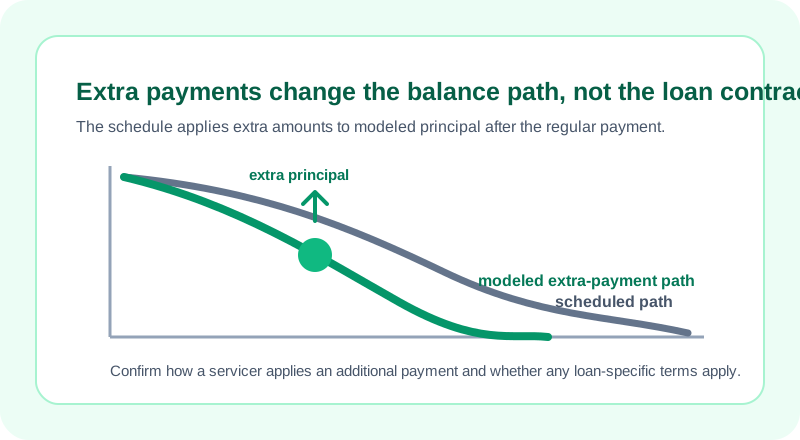
For each modeled month, interest is the opening balance multiplied by the monthly rate. The scheduled principal is the payment minus that interest. The calculator then adds any extra monthly amount, the modeled biweekly effect, or a selected one-time lump sum to principal, without allowing the principal amount to exceed the remaining balance.
Because interest is recalculated from the lower next-month balance, an extra amount can change later interest in this model. It does not tell a servicer how to apply a real payment.
Worked scenario: show the first payment split
Suppose the current balance is $180,000, the fixed annual rate is 5%, and there are 300 months remaining. The standard payment formula produces a baseline principal-and-interest payment of $1,052.26. In the first modeled month, interest is $180,000 × 0.05 / 12 = $750.00, leaving $302.26 of scheduled principal.
If you add $150 as modeled extra principal, the first month's principal becomes $452.26 and the modeled closing balance becomes $179,547.74. On the next month, the interest calculation starts from that lower balance. The schedule repeats this process until the balance reaches zero. This is a genuine arithmetic check you can reproduce before interpreting the longer-term interest and time differences.
Target dates and “biweekly” labels need a clear interpretation
When you select a target payoff date, the calculator iteratively finds a monthly extra amount that reaches that date under its fixed-rate schedule. Treat the result as the extra amount required by this model, not as a payoff instruction. A real account's payoff quote can change with posting dates, per-diem interest, unpaid charges, and the next required payment.
The biweekly option is deliberately described as an effect rather than a calendar. It adds one regular principal-and-interest payment divided by 12 to the model each month, which approximates the extra annual payment effect some borrowers expect from a 26-payment pattern. A servicer's actual biweekly program may use different timing, processing, fees, or rules. Ask before enrolling or assuming an extra transfer will be posted to principal.
Do not turn a payoff-versus-investment projection into advice
This tool can also project what the selected extra-payment cash might mathematically grow to if a user enters an assumed investment return. That comparison is intentionally narrow: it does not model taxes, account restrictions, market volatility, liquidity needs, employer matches, insurance, emergency savings, or a person's risk tolerance. A return assumption is not a forecast.
Use that feature to expose the assumption, not to settle a personal decision. The mortgage side of the page remains a deterministic fixed-rate schedule from the inputs you provide; the investment side is a hypothetical compound-growth calculation. If the key question is whether a different loan term or rate changes your payment, use the Mortgage Calculator or Mortgage Refinance Calculator for that separate comparison.
A safer payoff checklist
- Copy the current principal balance and required payment from a recent statement or servicer record.
- Check that your entered rate and remaining term describe the same loan position.
- Run a baseline before adding any extra amount.
- Ask the servicer how to label and time an additional payment so it is treated as intended.
- Request an official payoff amount before attempting to close a loan, because the final amount can differ from a planning schedule.
If a formula, explanatory label, or output looks inconsistent, report it through the page's issue form with non-sensitive sample inputs. That helps improve the calculator without collecting account details.