
50/30/20 Budget Calculator
Convert the take-home pay amount and pay frequency you enter into a needs, wants, and savings/debt-payoff split. Use the editable ratio and fit check as a planning comparison, not a rule about what your household must spend.
Example Scenarios
$4,800 Take-Home
Classic 50/30/20 split
$5,000 Take-Home
$2,500 needs · $1,000 savings
High Rent City
60/25/15 adjusted ratio
Income & Ratio View Results
Your 50/30/20 Split
Needs Bucket
Wants Bucket
Savings Bucket
Ratio Comparison
What each preset saves per year at your income.
| Ratio | Needs | Wants | Savings/mo | Savings/yr |
|---|
How This Is Calculated
Take-home income is multiplied by each bucket percentage. Biweekly and weekly pay is annualized to a monthly equivalent first. The fit check compares your actual rent and minimum debt payments against the needs bucket.
Check the method before you use the estimate
This page documents the formula, assumptions, and any specific external sources used for this tool.
See the methodPlanning estimate What this result can and cannot tell you
Educational estimate only. A budgeting ratio cannot determine what is affordable or appropriate for an individual household. Verify income, bills, debt terms, and savings account terms before making financial decisions. This is not financial advice.
How the 50/30/20 Budget Calculator works
These notes describe the calculation used on this page and the assumptions that can change a real-world result.
Monthly equivalent income is calculated from the selected pay frequency, then each bucket = monthly equivalent × selected needs, wants, or savings percentage. The fit check compares entered rent or mortgage and minimum debt payments with the needs bucket.
Assumptions on this page
- Weekly and biweekly amounts are annualized using the calculator’s stated pay-period counts before converting to a monthly equivalent; semimonthly and monthly inputs follow their selected period.
- The selected ratio is editable and is not a recommendation, legal requirement, affordability standard, or eligibility rule.
- The optional rent or mortgage and minimum-debt fit check uses only values entered on the page. It excludes other obligations, taxes, utility changes, irregular costs, and household circumstances.
- Savings annualization is arithmetic on the selected bucket and optional APY input; it does not guarantee an account return or a future balance.
Sources used on this page
- Consumer Financial Protection Bureau: My spending rule to live by Supports treating a needs, wants, savings, and debt split as a personal spending rule built from take-home pay rather than a universal prescription.
- Consumer Financial Protection Bureau: Assess your spending Supports the process of reviewing several months of actual income and spending, including irregular expenses, before relying on a budget.
Everything behind the 50/30/20 Budget Calculator
Formulas, reference charts, and detailed answers — expand any section you need.
A 50/30/20 split is a calculation baseline, not a rulebook
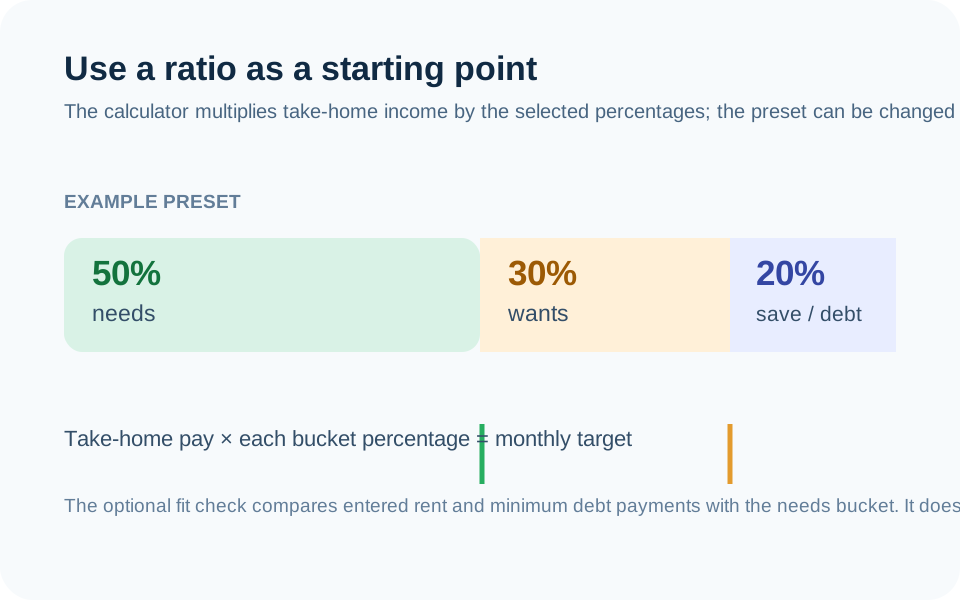
This page turns the take-home pay and frequency you enter into three buckets: needs, wants, and savings or debt payoff. The familiar 50/30/20 setup is one preset: 50% needs, 30% wants, and 20% savings/debt payoff. It is not a government standard, a lender rule, or a claim that every household can use the same shares.
The Consumer Financial Protection Bureau’s spending-rule worksheet treats a split as a personal rule built from take-home pay. That is the useful way to use this page: make the baseline visible, then change it when documented obligations and real conditions do not fit.
How pay frequency becomes a monthly amount
First, the calculator converts the selected pay frequency to a monthly equivalent. A weekly amount is annualized using 52 pay periods and divided by 12; a biweekly amount uses 26 pay periods and divides by 12. Then it multiplies that monthly equivalent by the ratio you select. For example, $4,800 monthly take-home pay at a 50/30/20 split yields $2,400, $1,440, and $960 in the three buckets.
Those are arithmetic targets. They do not include wages that have not been earned, payroll withholding changes, taxes, or a guarantee that the same pay will arrive every period. When income varies, use a careful time period and update the inputs instead of assuming a single high-pay period represents the year.
Use the optional fit check carefully
The fit check compares entered rent or mortgage and entered minimum debt payments with the needs bucket. It is deliberately narrow. It does not include utilities, food, insurance, medical costs, child care, transportation, taxes, property maintenance, or the rest of a household’s essential spending.
If rent and minimum debt payments already exceed the needs bucket, the right conclusion is not that a required payment can be ignored. It is that a preset does not describe the current numbers. Use a custom ratio, build an itemized plan in the Budget Calculator, and review the actual obligations directly.
A repeatable way to sort the buckets
Try classifying an item by asking whether losing it would break a current obligation or essential function, whether it is discretionary, or whether it is a deliberate transfer to savings or extra debt payoff. The answer can change by household and month. A basic mobile plan may be necessary; a plan upgrade may be discretionary. A minimum debt payment may be an obligation; an extra payment is a separate allocation decision.
Keep ambiguous items visible rather than forcing them into a category just to make the ratio look neat. You can add a note in your own budget and reconsider it after looking at more than one month of records.
Connect the 20% bucket to a specific question
A combined savings/debt bucket does not decide how much should go to each goal. Use the Emergency Fund Calculator for a coverage calculation based on entered essential expenses, the Savings Goal Calculator for a deposit-and-deadline scenario, or the Debt Payoff Calculator for a payment sequence. Each requires its own current assumptions.
Do not interpret an annual savings display as a return forecast. It is a simple annualized amount from the monthly bucket you selected, with any optional rate assumption shown separately.
When the percentages do not fit, keep the constraint visible
A ratio can fail for ordinary reasons: rent may rise before income changes, a household may have a temporary care expense, work may be seasonal, or a required debt payment may consume more than a preset expects. The helpful response is to state a custom split and document the fixed obligations, not to relabel every required expense as discretionary just to make a chart appear balanced.
Use the reverse calculation as a math question only. It can show the monthly take-home amount required for a set of desired bucket amounts under the chosen ratio. It cannot determine whether an income is attainable, whether a lender will approve a payment, or whether a change in employment is appropriate. Pair it with actual spending records and current pay information.