Riprap Calculator

Turn a documented protection area, specified placement depth, supplier density, and disclosed allowance into an approximate rock order, optional fabric area, and optional price arithmetic. The calculator does not size riprap, select gradation or a filter, analyze flow or slope stability, design a culvert outlet or shoreline, or approve an erosion-control installation.

Example Projects

Slope / Embankment

50 × 10 ft • Class II

Channel / Ditch

60 × 6 ft • Class I

Shoreline / Pond

40 × 12 ft • Class III

Culvert Outlet

20 × 15 ft • Class IV

Configure Riprap View Results

Stone Class & Density

Class II (Medium): 8 - 18 in stone, ~18 in placement depth.

Riprap Estimate

Riprap Weight
0 tons
Order weight, with waste allowance.
Riprap Volume
0 yd³
Cubic yards to order.
Project Area
0 ft²
Footprint to cover.
Recommended Class
Suggested for this application.
View Calculation Breakdown
Project area0 ft²
Placement depth0 ft
Volume (no waste)0 ft³
Volume (with waste)0 ft³
Volume in cubic yards0 yd³
Volume in cubic meters0 m³
Density used1.50 tons/yd³
Riprap weight0 tons

How this was calculated:

Enter dimensions to see the calculation…
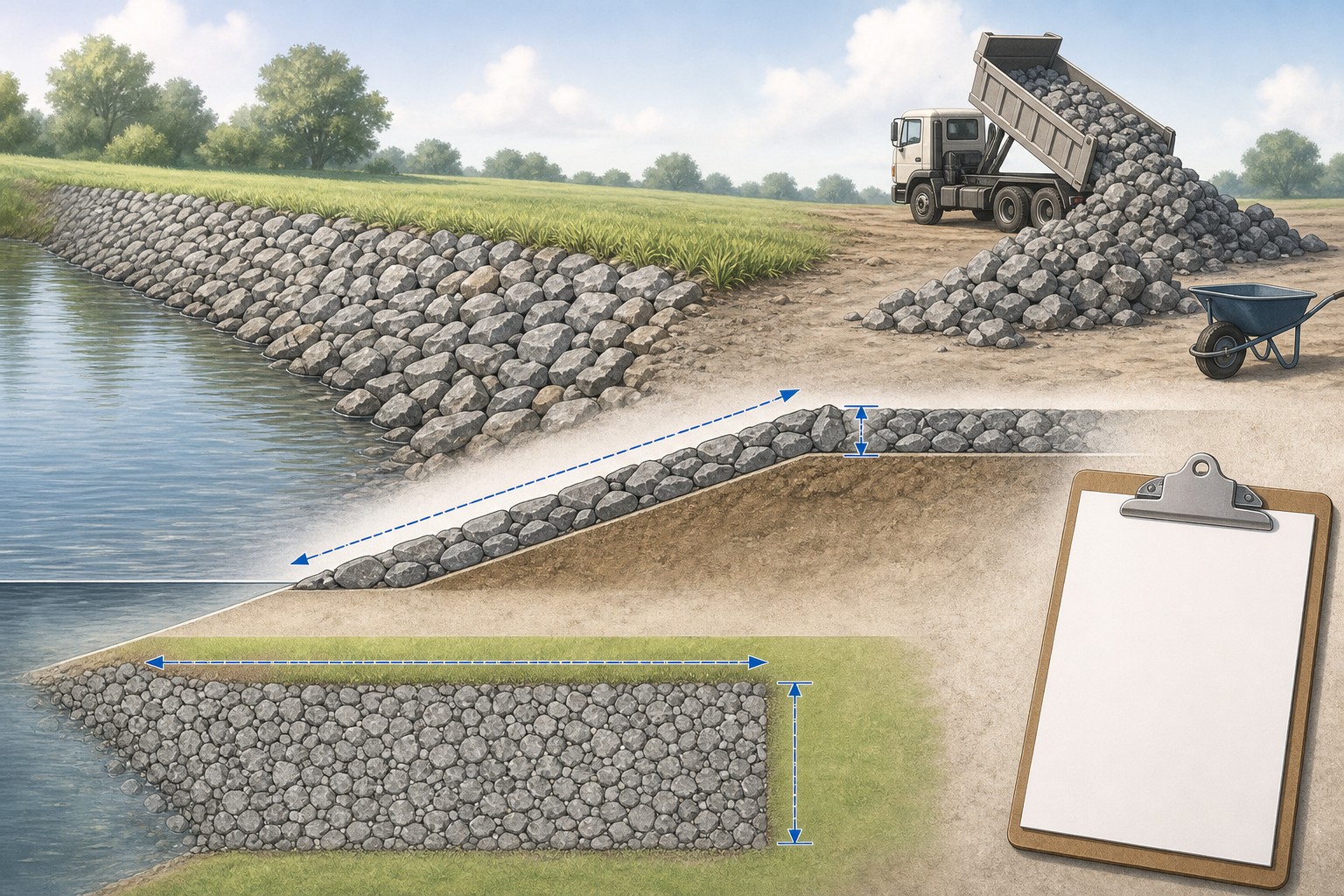
Illustrated riprap slope takeoff showing a measured armored face, a specified rock layer, supplier density, a separate filter layer, and a design-verification boundary.
A useful riprap order traces material quantity back to a documented protection limit, specified layer, and supplier delivery unit.
Transparent calculator

Check the method before you use the estimate

This page documents the formula, assumptions, and any specific external sources used for this tool.

See the method
Planning estimate What this result can and cannot tell you

Use this calculator only to organize a riprap quantity after the responsible project documents identify the protection limits, rock product or gradation, installed thickness, filter or bedding arrangement, and delivery basis. Confirm hydraulic, geotechnical, drainage, slope, outlet, shoreline, toe, permit, material, installation, access, and safe-work requirements with the responsible qualified parties before ordering or placing stone.

Read the full site disclaimer.

Found an error or unclear result? Tell us what happened so it can be investigated.
Calculator feedback

Report an issue with Riprap Calculator

Your report is saved for the Octa Calculator team to review. Do not include sensitive financial, medical, or personal information.

This site is protected by reCAPTCHA and the Google Privacy Policy and Terms of Service apply.

Method & sources

How the Riprap Calculator works

These notes describe the calculation used on this page and the assumptions that can change a real-world result.

Specified-layer volume, entered density, and optional fabric-coverage arithmetic Area (sq ft) = length (ft) x width (ft). Raw rock volume (cu ft) = area x placement depth (ft). Adjusted rock volume = raw volume x (1 + entered waste percentage). Cubic yards = adjusted cu ft / 27. Tons = adjusted cubic yards x entered tons per cubic yard. When fabric is enabled in the page interface, fabric area = entered area x 1.10.

Assumptions on this page

  • The calculator models one rectangular, planar coverage area and a uniform entered placement depth. It does not derive a bank face from horizontal dimensions, calculate a curved channel, measure a toe trench, or resolve changing cross sections, transitions, corners, or irregular edges.
  • The page applies the entered waste percentage to rock volume only, bounded from 0% to 50%. It does not apply that percentage to filter fabric, calculate offcuts, or determine whether an allowance is appropriate.
  • The page interface calculates fabric as the entered coverage area plus a fixed 10% overlap. It does not calculate roll width, seam direction, anchorage, trenches, wraparound, damage, filter compatibility, bedding, or installation details.
  • Material-density values are editable convenience inputs: limestone 1.40, granite 1.60, sandstone 1.40, basalt 1.70, and generic stone 1.50 tons per cubic yard. They are not universal supplier weights and can vary with product source, gradation, rock properties, moisture, voids, loading, and delivery convention.
  • The mode and class controls provide editable interface presets. Their class labels, stated stone-size ranges, and default layer depths are not a project-specific riprap gradation, hydraulic analysis, erosion-control specification, or design recommendation.
  • Optional cost totals equal entered price per ton x calculated tons, plus entered fabric price per square foot and delivery. They exclude unentered tax, permits, excavation, toe or bedding work, geotextile details, equipment, labour, access, disposal, supplier minimums, price changes, and availability.
  • This is a material-takeoff aid, not hydraulic, geotechnical, drainage, shoreline, culvert, slope-stability, structural, permitting, installation, or safety guidance.

Sources used on this page

Guide & Reference

Everything behind the Riprap Calculator

Formulas, reference charts, and detailed answers — expand any section you need.

Worked calculator example: 50 ft by 10 ft at 18 in placement depth

Assume the responsible project has already specified the protected area and rock layer. Enter 50 ft length, 10 ft width, 18 in depth, 10% rock allowance, 1.50 tons per cubic yard, and turn on fabric. The calculator gives this reproducible quantity sequence:

  1. Area: 50 × 10 = 500 sq ft.
  2. Raw rock volume: 500 × 1.5 ft = 750 cu ft, or 27.7778 cu yd.
  3. Adjusted rock volume: 750 × 1.10 = 825 cu ft; 825 ÷ 27 = 30.5556 cu yd.
  4. Estimated tons: 30.5556 × 1.50 = 45.8333 tons.
  5. Fabric coverage in this page: 500 × 1.10 = 550 sq ft.

With optional values of 45 per ton, 0.50 per sq ft for fabric, and 200 delivery, the same inputs produce 2,062.50 material cost, 275.00 fabric cost, and 2,537.50 total in the selected currency. Those values are arithmetic only; they do not include any unentered project work or supplier terms.
A rock order begins after the protection design is known

Riprap is not simply large gravel. It is a specified rock protection system that can involve a rock gradation, placed layer thickness, prepared foundation, filter or bedding, toe treatment, transitions, and limits chosen for a particular waterway, bank, channel, outlet, or shoreline. This calculator handles only a later step: turning documented coverage geometry and an entered supplier weight into a material estimate.

That boundary matters. The Federal Highway Administration's HEC-15 reference describes flexible-lining design in hydraulic terms, while the U.S. Army Corps of Engineers discusses riprap as part of channel and structure protection. Neither the word riprap nor a tonnage total selects the stone, the thickness, a safe slope, or a suitable outlet treatment.

Use the page after those inputs are documented. For a longer quantity workflow that keeps geometry and hydraulic design separate, see How to Estimate Riprap by Layer Volume.

Measure the actual surface that receives stone

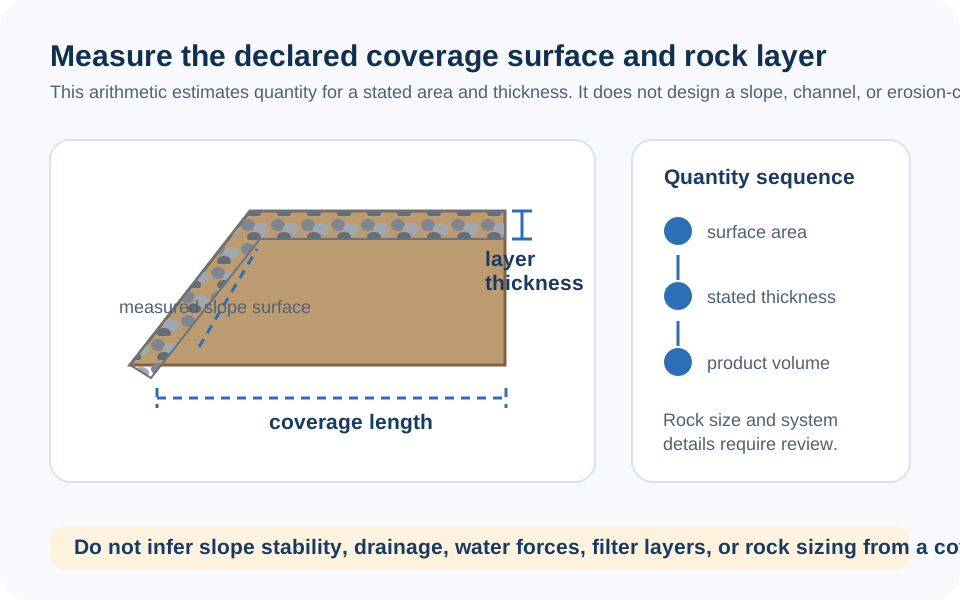
On a flat rectangle, coverage area is length times width. On a sloped bank, the first number must describe the actual face being armored, not merely the horizontal distance visible on a plan. Measure the slope length directly or obtain it from the project's documented cross section. If a channel curves, a bank changes height, or a protection area turns around a structure, divide it into simple strips and keep each strip visible on the takeoff.

Record what happens at the top, bottom, ends, outlets, structures, and changes in thickness. Do not add an invented toe, trench, transition, or layer depth just to make the calculator inputs look complete. An unresolved design item should remain a question for the responsible project team, not become a hidden quantity assumption.

Diagram showing a sloped riprap face measured along its actual surface, then multiplied by specified layer thickness and supplier density to create a material takeoff.
A sloped surface is not automatically the same area as its plan-view projection; measure the documented surface that will receive the specified layer.

The formula this calculator actually uses

For one entered surface, the page uses straightforward layer geometry:

Area = length (ft) × width (ft)

Raw volume (cu ft) = area (sq ft) × entered placement depth (ft)

Adjusted volume = raw volume × (1 + entered waste percentage)

Cubic yards = adjusted volume (cu ft) ÷ 27

Tons = adjusted cubic yards × entered density (tons per cu yd)

The unit conversion from cubic feet to cubic yards is documented in NIST Handbook 44 Appendix C. The density is not a universal conversion. Replace the editable material default with the supplier's stated delivery conversion for the exact rock product and gradation whenever it is available.

Class, density, and thickness are three different decisions

The page's mode and class selections make the form faster to explore, but they are not a product submittal or a design standard. Their labels and default thicknesses are editable inputs. Do not present a selected Class I, II, III, or IV label as proof that a quarry product meets a project specification, that its gradation is acceptable, or that its thickness is adequate for a channel, slope, shoreline, culvert, or outlet.

Likewise, the density menu is a conversion aid rather than a material certificate. A named limestone, granite, sandstone, or basalt product can have a different bulk delivery weight from the convenience value shown. Ask the supplier for the specific product name, gradation, source, quoted unit, stated tons-per-yard or bulk unit weight, minimum load, and delivery basis. Record that information next to the takeoff.

The professional design questions are separate: flow and water levels, erosion and scour potential, slope and foundation conditions, filter compatibility, toe and transition details, public-waterway or permit obligations, and construction access can all change the scope. The calculator should make those missing inputs more visible, not disguise them.

Fabric is a separate surface calculation

When the fabric option is enabled, this page multiplies the entered surface area by 1.10. That fixed 10% is only a coverage allowance for the form; it is not a roll layout. It does not know roll width, seam spacing or direction, overlaps beyond 10%, anchorage, trenches, joints, cutouts, damage, UV exposure, filtration criteria, or whether a geotextile, granular filter, bedding, or another arrangement is specified.

Keep each layer separate on the takeoff. Use the Excavation Calculator for documented removal or trenches, and the Gravel Calculator for a distinct specified granular bedding layer. Do not assume that stone volume equals excavation volume, that a fabric area defines the rock amount, or that a calculator switch establishes a filter detail.

A final boundary and order check

Before ordering, compare the output with the drawing or field sketch, product submittal, supplier quote, and delivery plan. Check the measured surface, installed thickness, allowance, density, unit, access, stockpile location, and any separately measured toe, transition, bedding, fabric, or excavation item. The page's cost total is not a quote and cannot decide whether material can be placed safely or legally.

This calculator does not design a riprap revetment, stabilize a bank, set rock size, choose a geotextile, evaluate water velocity or scour, approve a culvert outlet, assess a retaining-wall condition, or provide a safe installation sequence. Escalate those questions to the responsible qualified project parties and authorities. If an input or result on this page appears unclear, you can report a calculator issue for review.

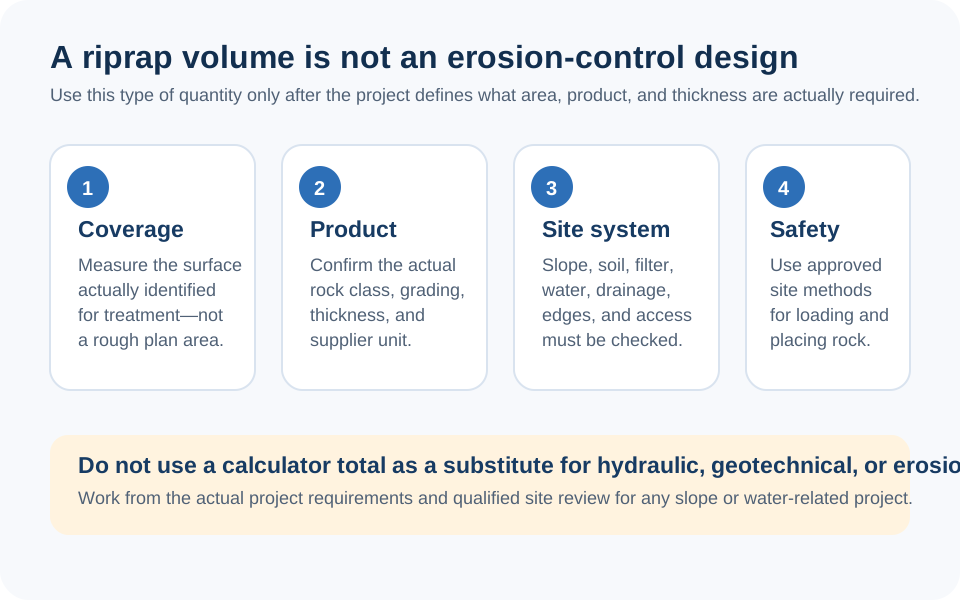
Checklist illustration separating a riprap quantity takeoff from rock sizing, gradation, toe and filter details, hydraulic design, site safety, permits, and final supplier order.
Quantity math can support a material discussion, but it cannot make a bank, outlet, channel, shoreline, or erosion-control design safe.
FAQ

Frequently Asked Questions

How does this calculator calculate riprap tons?
It multiplies the entered length, width, and placement depth, applies the entered rock allowance, divides by 27 for cubic yards, then multiplies by the entered tons-per-cubic-yard density. It is an order estimate for a documented layer, not a riprap design method.
Can the class selector tell me what riprap size or gradation is right?
No. The class labels and default depths are editable form presets. Rock size, gradation, thickness, filter, toe, and transition details depend on project-specific hydraulic, geotechnical, drainage, and permitting requirements.
Are the rock-density defaults accurate for every supplier?
No. They are convenience inputs only. Use the supplier's stated delivery conversion for the exact rock product and gradation because source, voids, moisture, handling, and local selling practice can change bulk weight.
Should I measure horizontal width or the actual slope face?
For a sloped protection area, use the actual surface length that will receive stone, or the equivalent documented cross-section measurement. A horizontal projection can understate the installed surface.
How does the filter-fabric result work?
When enabled in the page interface, fabric area equals the entered coverage area plus a fixed 10% overlap. It is not a roll layout and does not include anchorage, trenching, seams, product selection, or filter design.
Does the waste allowance also increase fabric and cost?
The entered waste percentage increases rock volume and therefore rock tonnage and rock cost. The page's fabric area uses its separate fixed 10% overlap, and fabric cost follows that area.
Is the price result a supplier quote or installed-project price?
No. It uses only the entered per-ton rock price, entered fabric price, and entered delivery value. It excludes unentered tax, permits, product minimums, equipment, labour, toe or bedding work, access, installation, and availability.
Can I use this page to design erosion protection or a culvert outlet?
No. It cannot assess flow, scour, slope stability, foundation conditions, rock gradation, filter requirements, public-waterway rules, or safe construction. Use it only after those design decisions are documented.

Related Calculators

Explore all Construction calculators →